
If your goal is to reduce wasted spend, fix keywords first; if your goal is to capture more sales fast on a launch or deal, adjust placement bids first. Amazon’s dynamic bidding already reweights spend toward high-converting placements automatically, so manual placement changes should be the exception, not the default. Run a single-variable test before touching your entire account.
TL;DR:
- Manual placement adjustments are most effective during product launches, short-term promotions, or when rapid inventory movement is necessary, rather than for general optimization.
- Monitoring the last two weeks’ placement report can help determine whether top-of-search bids are worth the extra cost, especially if conversion rates are already high.
- Keyword harvesting from automatic campaigns and moving high-performing search terms into manual campaigns often outperforms placement tweaks for improving ROAS.
- Placement bid modifiers multiply the base keyword bid, with aggressive modifiers risking rapid budget depletion without proportional conversion increases.
Table of Contents
- When placement bid adjustments should take priority
- When keyword targeting and match-type work should take priority
- How placement modifiers and keyword bids actually combine
- How to test placement vs. keyword changes without guessing
- Your action plan for this week and this month
- What actually separates the sellers who get this right
- Run your next test without the spreadsheet
- Sources
- FAQ
When placement bid adjustments should take priority
Placement changes earn their keep in a handful of specific situations, not as a general-purpose lever. A product launch, a Lightning Deal, or excess inventory you need to move fast are the classic cases: you need visibility now, and you’re willing to pay a premium for top-of-search real estate to get it.
The placement report tells you whether that premium is actually working. If top-of-search is consuming a large portion of your budget but converting no better than rest-of-search, you’re paying for position without getting paid back. If the opposite is true, a top-of-search modifier is money left on the table.
Here’s when placement modifiers genuinely move the needle:
- New product launches that need immediate visibility to build review velocity and sales rank
- Time-limited promotions (Lightning Deals, Prime Day windows) where the payoff window is short
- Excess inventory that needs to move before storage fees or expiration eat the margin
- Defending branded search terms from competitors bidding on your product name
Amazon’s dynamic bidding already raises bids in real time for impressions more likely to convert and lowers them elsewhere, according to Amazon’s own guidance. That’s a strong default for advertisers focused on maximizing sales. Manual placement modifiers still matter when you need to override that default. Deal-day traffic patterns, for instance, don’t always match historical conversion data, so the algorithm may underweight a placement that’s about to perform well.
Pro Tip: Before raising a top-of-search modifier, check the placement report for the last two weeks. If conversion rate there already beats your account average, you’re reinforcing a winner, not gambling on a hunch.
When keyword targeting and match-type work should take priority
Keyword work usually wins when your problem is efficiency, not visibility. If ACoS is climbing while impressions stay flat, the issue is rarely where your ad shows. It’s what it’s showing for.
The search-term report is where this shows up first. Look for three patterns:
- Profitable search terms appearing in your automatic campaigns that aren’t captured by any manual keyword yet
- Broad-match keywords pulling in loosely related traffic that burns budget without converting
- The same query showing up week after week with a strong conversion rate but a modest bid
Automatic campaigns are built for discovery. Amazon’s guidance on keyword targeting recommends running automatic campaigns to surface converting queries, then moving the winners into manual exact-match campaigns where you control the bid precisely. This harvest-and-promote workflow is one of the most reliable ways to improve ROAS without touching placement at all, and Selloop’s guide on keyword harvesting walks through the weekly version of this routine.
Niche SKUs benefit most from this approach. A specialty kitchen tool or a low-competition supplement variant often has a handful of long-tail queries that convert exceptionally well but never get enough bid weight in broad or automatic targeting. Isolating those queries into their own exact-match campaign, with a bid that reflects their actual conversion rate, tends to lift ROAS faster than any placement change could.
How placement modifiers and keyword bids actually combine
Placement bid adjustments don’t add to your keyword bid. They multiply it, and that distinction changes how you should think about risk.
Your effective max bid for that placement becomes $1.50, not $1.50 total spend, but a $1.50 ceiling every time that keyword triggers a top-of-search impression, according to Amazon’s help documentation on placement and bidding interactions. Sponsored Products allows modifiers up to 900%, per Amazon’s best practices guide, which means a $1.00 keyword bid could theoretically hit a $10.00 effective bid at that placement.
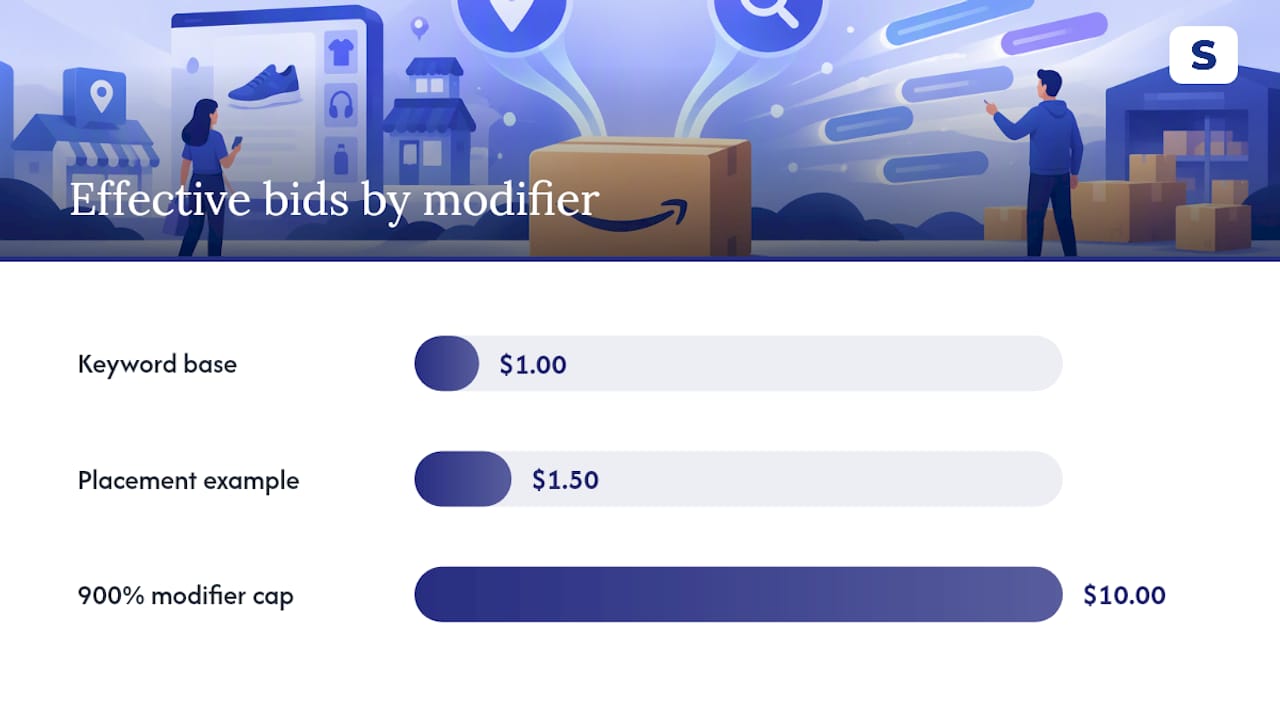
Apply an aggressive modifier to a keyword that already carries a high base bid, and you can burn through a daily budget in hours without a proportional increase in conversions. This is the most common way accounts blow past their target ACoS without anyone changing the keyword bids themselves.
The check is simple: monitor spend and conversion rate by placement weekly, not just by campaign. If effective CPC at a placement rises more than 30% without a matching lift in conversions after your test window closes, scale the modifier back and retest in smaller increments rather than reverting to zero.
How to test placement vs. keyword changes without guessing
Pro Tip: Write your hypothesis down before you touch anything. “Let’s see what happens” is not.
- Pick one variable. Choose either a placement modifier or a keyword bid or match type change, never both in the same campaign in the same window. Changing two levers at once makes it impossible to know which one caused the result.
- Set a success metric up front. ROAS, ACoS, and conversion rate are the three that matter most; pick the one tied to your actual objective (efficiency vs. growth) and define the target number before you start.
- Pull three reports. The placement report shows where impressions and conversions actually happened. The search-term report shows which queries drove them. The advertised product report ties performance back to specific ASINs so you’re not averaging a winner and a loser together.
- Apply a decision rule. If the metric hits your target and spend stayed within pacing, promote the change account-wide. If it missed the target or budget burned faster than usual, roll it back and retest with a smaller step.
Your action plan for this week and this month
Start today by pulling your placement and search-term reports and flagging any obvious mismatch, high top-of-search spend with weak conversion, or a search term with strong CVR that’s still buried in automatic targeting.
Over the next one to three weeks, run single-variable tests on the mismatches you found. Add negative keywords for the noisy queries burning budget, and adjust daily budgets so an aggressive placement test on one campaign doesn’t starve the others.
Scale a change once it clears three bars:
- The result repeats across at least two testing cycles, not just one lucky week
- ROAS improved without a corresponding spike in ACoS
- Conversion lift shows up consistently across the placements you actually adjusted, not just in the account-wide average
What actually separates the sellers who get this right
Most advertisers treat placement vs keywords as a permanent camp to join. Wrong framing. The accounts that consistently improve ROAS treat it as a rotating diagnosis: pull the reports, find the actual leak, fix that specific lever, move on.
What gets underestimated is how often the two levers get changed in the same week by accident, a bid tweak here, a modifier bump there, and then nobody can explain which one caused the ACoS swing. That’s not a strategy problem. It’s a tracking problem.
Selloop was built around that exact gap. It scans campaigns to flag where spend is inefficient, whether the cause traces back to placement or keywords, and backs each recommendation with the specific data behind it rather than a generic score.
— Selloop
Run your next test without the spreadsheet
Selloop is the alternative to manually cross-referencing placement and search-term reports every week. It scans your campaigns, flags the high-spend, low-return spots, whether the cause is a placement modifier or a weak keyword, and shows the exact numbers behind each recommendation.
Once you act on a suggestion, Selloop tracks the result from day 8 and gives a second verdict from day 15, so you know whether that top-of-search bump actually paid off before you roll it out to the rest of your catalog. It also handles the keyword side: Selloop proposes converting search terms from your automatic campaigns to add as exact keywords, and negative keyword suggestions to cut the noisy traffic before it drains your budget, with one click to apply each. Selloop’s AI-driven optimization approach is built to keep single-variable testing simple, so you’re never guessing which lever caused which result.
If you’re deciding between a placement change and a keyword change this week, start with the smaller one. Check Selloop's pricing plans and run your first test on a single campaign before touching the rest of your account.
Sources
For the mechanics behind everything above, read Amazon’s own dynamic bidding guide and its Sponsored Products best practices page. Selloop’s bidding strategy guide covers placement modifiers in more depth, and TrackAff’s server-side tracking is worth a look if you suspect your conversion data itself is the real problem.
- Guide to dynamic bidding — Amazon Ads
FAQ
How long should a placement or keyword test run?
Selloop tracks every change, giving a first verdict from day 8 and a second one from day 15, instead of a premature read.
Does dynamic bidding replace the need for placement modifiers?
Not entirely. Dynamic bidding already raises and lowers bids in real time based on conversion likelihood, which covers most everyday cases, but manual modifiers still help during launches, deals, or when you need to override the algorithm’s historical assumptions.
Which report should I check first, placement or search term?
Check whichever matches your suspected problem: the placement report if you think you’re overpaying for visibility, the search-term report if you think irrelevant traffic is draining budget. Most accounts benefit from reviewing both every two weeks, since conversion rates often differ significantly by placement.
Can raising a placement modifier hurt my budget?
Yes. Placement modifiers multiply your base keyword bid, so a 50% modifier on a $1.00 bid creates a $1.50 effective max bid at that placement, and aggressive modifiers on high-bid keywords can exhaust a daily budget fast without matching conversion gains.
How much does Selloop cost to test this framework?
Agencies managing multiple accounts can request custom terms for the AGENCIES & ENTERPRISE tier directly through Selloop.