Dayparting Amazon Ads: A Data-First 2026 Playbook

Dayparting Amazon ads means concentrating your ad spend on the hours and days that actually convert, rather than spreading budget evenly across all 168 hours of the week. For most sellers, it’s worth testing — but only after you have enough data to tell signal from noise. Before you touch a single schedule, run through this quick checklist:
- Pull hourly Sponsored Products data over a sufficiently long period and look for a significant conversion gap between your best and worst windows.
- Set up a conservative experiment: throttle the hours with the lowest conversion rather than pausing campaigns entirely.
- Monitor for a few weeks before drawing conclusions.
One risk to flag upfront: cutting delivery abruptly can force Amazon’s algorithm to relearn, with practitioners reporting CPC increases in the 15–30% range after creating delivery gaps.
Table of Contents
- What is dayparting in Amazon PPC?
- Why dayparting can improve your ROAS and ACOS
- When dayparting backfires
- How to analyze your hourly data before touching schedules
- A 6-step dayparting experiment you can run this week
- What Amazon’s native tools can and can’t do
- Which KPIs to track and how often to check them
- How to diagnose a dayparting test that isn’t working
- Why Selloop recommends a 21-day validation window
- Key Takeaways
- The honest case for and against dayparting
- Selloop makes dayparting experiments measurable, not just manageable
- Useful sources
What is dayparting in Amazon PPC?
Ad scheduling on Amazon, commonly called dayparting, is the practice of adjusting when your campaigns run or how aggressively they bid based on the time of day or day of the week. The goal is simple: spend more when buyers are ready to purchase, spend less (or nothing) when they’re not.
A few terms worth pinning down before going further:
- Hour-of-day targeting: Adjusting bids or budgets for specific clock hours, such as 6 PM–10 PM.
- Day-of-week targeting: Shifting spend toward weekdays or weekends based on category behavior.
- Peak window: The hours where your conversion rate (CVR) is consistently highest.
- Red zone: Hours with high spend and low CVR — the primary target for throttling.
- Green zone: Hours with strong CVR and acceptable ACOS — where you want budget concentrated.
Campaign-level scheduling controls when a campaign is active or how its budget is distributed. Bid adjustments operate at the keyword or placement level and can layer on top of scheduling. Budget-boost rules, which Amazon’s native Campaign Manager supports, let you increase spend during peak hours without touching base bids. These are three distinct levers, and confusing them is one of the most common setup errors.
Modern ad platforms in 2026 treat dayparting more as a guardrail than a primary optimization tool. Smart bidding handles a lot of intra-day adjustment automatically. Dayparting’s job is to define the boundaries — exclude the hours with zero business value, then let the algorithm work within those limits.

Why dayparting can improve your ROAS and ACOS
The core benefit is straightforward: you stop paying for clicks that don’t convert. A campaign running at 2 AM in a category where buyers shop between 7 PM and 11 PM is burning budget on impressions that rarely close. Redirecting that spend into your green zone raises effective ROAS without changing a single bid.
Three specific account patterns tend to see measurable ACOS improvements from dayparting:
- Budget-capped campaigns: If your daily budget runs out by early afternoon, concentrating spend on peak hours means you’re not wasting morning budget on low-intent browsing.
- High-consideration purchase windows: Categories like home appliances, supplements, or electronics where buyers research in the evening and purchase the same night.
- High-CPC categories with low late-night CVR: If you’re paying $3.50 per click at 1 AM and converting at half your daytime rate, the math on pausing that window is easy.
Beyond efficiency, dayparting creates inventory velocity advantages that compound over time. Concentrating spend during key windows — especially the first 72 hours of a launch or restock — can generate the kind of sales velocity that improves buy-box share and nudges organic ranking upward. Smaller sellers can also use dayparting as a competitive weapon: shift spend into hours when enterprise competitors are less active and your relative share of voice increases without raising bids.
A structured audit of multiple accounts found that dayparting produced clear lifts only in specific scenarios. For the majority of accounts, it was either noise or actively harmful. (Velocity Sellers)
That stat is worth sitting with. Dayparting isn’t a universal win. It’s a precision tool that pays off in specific conditions.
When dayparting backfires
The biggest risk is what happens to Amazon’s algorithm when you cut delivery. Pausing campaigns can force a relearning cycle, with practitioners reporting CPC increases in the 15–30% range after creating delivery gaps. If your campaign was running efficiently before the pause, you may spend weeks recovering that efficiency after you resume.
A few account shapes where dayparting usually makes things worse:
- New campaigns in the learning phase. Any campaign under 30 days old or with fewer than 50 conversions doesn’t have enough signal for the algorithm to work with. Adding schedule constraints on top of that is compounding uncertainty.
- Low-volume accounts. If a campaign generates fewer than 10 clicks per day, hourly data is too thin to detect a real pattern. What looks like a red zone might just be a slow Tuesday.
- Categories with 24/7 demand. Consumables, pet supplies, and everyday household items often see purchases spread across all hours. Rigid off-peak pauses can miss international buyers or late-night shoppers, and the conversion gap between peak and off-peak rarely justifies the algorithm disruption.
- Accounts without strong campaign structure. Manual schedules can fight Amazon’s automated pacing. If your keyword targeting, match types, and negative keywords aren’t already clean, fixing those will move the needle faster than any schedule change.
The honest framing for 2026: dayparting is often a guardrail, not a growth lever. Use it to exclude hours with demonstrably zero business value. Don’t expect it to rescue a structurally weak campaign.
How to analyze your hourly data before touching schedules
Good dayparting starts with a data pull, not a schedule change. Here’s the exact process.

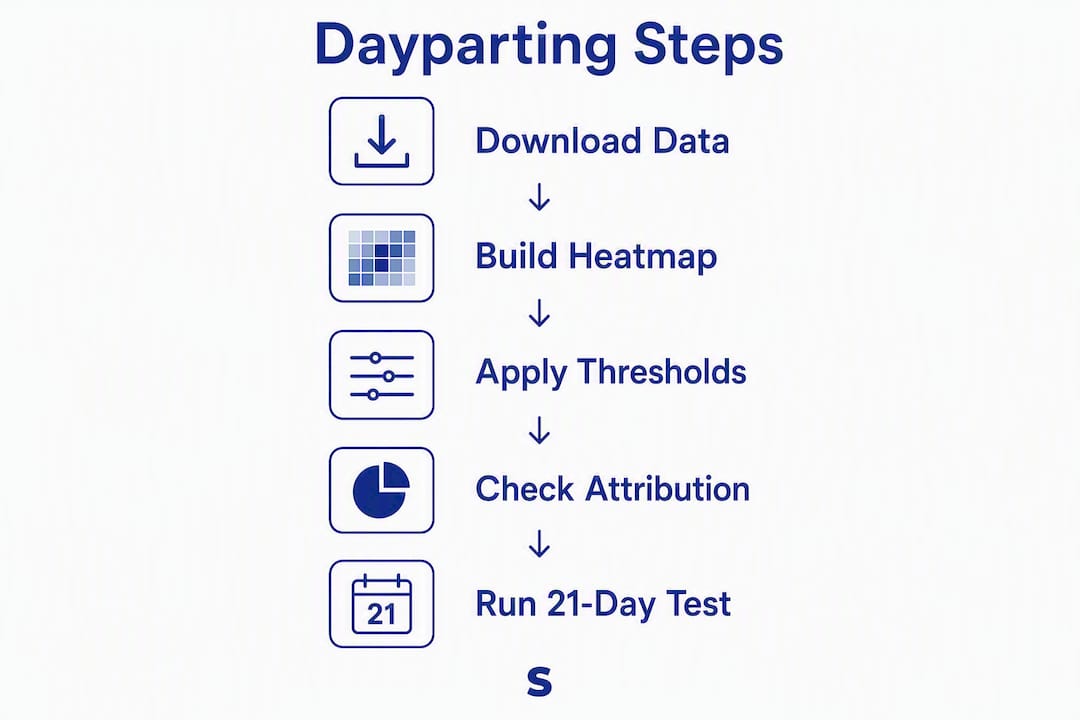
Step 1: Download your hourly reports. In Amazon Seller Central, go to Reports → Advertising Reports → Sponsored Products. Select “Search term” or “Campaign” as the report type, set the date range to at least 30 days (60 days is more reliable for detecting stable patterns), and export. Practitioners recommend using at least a month of data, with longer periods providing more reliable pattern detection.
Step 2: Build a heatmap. In Excel or Google Sheets, pivot the data by hour of day (rows) and campaign or SKU (columns). Calculate CVR, ACOS, and spend for each cell. Color-code: green for CVR above your account average, red for CVR below 50% of your account average with meaningful spend.
Step 3: Apply minimum thresholds before acting. A single red cell doesn’t justify a schedule change.
| Signal | Minimum threshold to act |
|---|---|
| Days of data | 30 days (60 preferred) |
| Conversions per hour slot | 5+ over the full period |
| CVR gap (peak vs. off-peak) | 2x or greater |
| Spend in red zone | >10% of total campaign spend |
| Account age | 60+ days live |
Step 4: Check attribution windows. Amazon’s default attribution is 7-day click, 1-day view. An order placed at 11 PM may have originated from a 7 PM click. Don’t penalize an hour for conversions that were attributed elsewhere.
Step 5: Set your 21-day measurement window. Once you’ve identified candidate red and green zones, commit to a 21-day test period before evaluating results. Weekly variance in ACOS is normal; 21 days smooths enough of that noise to see a real signal.
A 6-step dayparting experiment you can run this week
This workflow is conservative by design. The goal is to learn, not to over-optimize on thin data.
-
Form a hypothesis. State it explicitly: “Pausing spend between 12 AM and 5 AM will reduce ACOS by at least 10% without dropping total conversions.” A written hypothesis forces you to define success before you start.
-
Segment your campaigns. Don’t test dayparting across your entire account at once. Pick one or two campaigns that meet the data thresholds above: budget-capped, high-CPC, or with a clear 2x+ CVR gap in the heatmap.
-
Choose your implementation method. Three options exist, each with trade-offs:
- Campaign duplication: Clone the campaign, set the duplicate to run only during peak hours, pause the original during off-peak. Gives full control but splits data and history.
- Budget-boost rules: Use Amazon’s native schedule-based budget rules to increase budget during green-zone hours. Lower risk, no algorithm disruption, but only works in one direction (up, not down).
- Budget breathing: Set a lower daily budget and let it exhaust naturally during peak hours. Blunt but simple, and doesn’t require third-party tools.
-
Set conservative parameters. Throttle the worst 4–6 hours identified in your heatmap. If using bid adjustments, start with a 20–30% reduction rather than a full pause. For launch or restock windows, concentrate spend during the first 72 hours in your historically strongest conversion window.
-
Run the test for 21 days. Don’t touch the campaign during this period. Changes mid-test invalidate the comparison.
-
Evaluate against your hypothesis. Compare ACOS, ROAS, CVR, and total conversions between the 21-day test period and the equivalent baseline period. If the improvement is below your threshold or total conversions dropped, roll back and document what you learned.
Pro Tip: Before duplicating campaigns, check your campaign health signals — budget caps, spend patterns, and inventory status. A campaign hitting its daily budget cap every day is a much stronger dayparting candidate than one spending freely.
What Amazon’s native tools can and can’t do
Amazon’s Campaign Manager supports schedule-based budget rules that let you boost your daily budget by a set percentage during specific hours. That’s useful for green-zone amplification. What it doesn’t support natively is throttling bids below base rates or pausing delivery entirely on a schedule — the kind of full scheduling control you’d get in Google Ads.
For sellers who want true hour-level bid suppression, the practical options are:
- Campaign duplication with separate active/inactive schedules managed manually or via rules.
- Third-party rule engines (generic category: automated bid management platforms) that can apply bid multipliers below 1x on a schedule.
- Budget breathing by setting a daily cap low enough that the campaign exhausts spend by mid-afternoon, effectively going dark for the rest of the day.
A few gotchas to watch:
- Shared budgets complicate dayparting. If multiple campaigns share a budget, schedule changes on one affect all of them.
- Placement modifiers (top of search, product pages) interact with schedule-based bid changes. A 20% bid reduction at 2 AM combined with a 50% top-of-search modifier can produce unexpected effective bids.
- Overlapping campaigns targeting the same keywords will compete against each other if you duplicate campaigns for scheduling purposes. Use negative keywords or separate targeting to prevent internal auction overlap.
The simplest low-risk implementation: use Amazon’s native budget-boost rules to amplify your green zone by 20–30%, and leave the rest of the schedule untouched. You get upside without the algorithm disruption risk.
Which KPIs to track and how often to check them
Running a dayparting test without a clear monitoring plan is how sellers end up making decisions on noise. Track these metrics for every test:
- ACOS (primary efficiency signal)
- ROAS (revenue return per dollar spent)
- CVR (conversion rate by hour — the core dayparting signal)
- CPC (watch for increases that signal algorithm relearning)
- Spend by hour (confirm budget is actually shifting as intended)
- Impressions (a sharp drop signals delivery problems, not efficiency gains)
- Top-of-search impression share (schedule changes can affect placement distribution)
Reporting cadence: Check spend and CPC daily for the first week — you’re looking for early warning signs like CPC spiking 20%+ or impressions collapsing. After the first week, shift to weekly statistical assessments. Don’t make optimization decisions on daily ACOS swings; attribution lag means today’s numbers often reflect yesterday’s clicks.
Decision thresholds: Before the test, define what counts as a win. A reasonable bar: ACOS improvement of 10% or more over baseline with no more than a 5% drop in total conversions. If CPC rises more than 20% and CVR doesn’t improve to compensate, that’s a signal to roll back regardless of where you are in the test window.
Attribution windows matter here. A 7-day click window means conversions from a Thursday purchase might be attributed to a Monday click. When comparing hourly performance, look at 14-day rolling windows rather than single-day snapshots to reduce attribution noise.
How to diagnose a dayparting test that isn’t working
If your test results look flat or negative, work through this diagnostic before rolling back.
Check sample size first. If the campaign generated fewer than 30 conversions during the test period, the result is statistically meaningless. Don’t act on it either way.
Check for budget caps. If the campaign hit its daily budget cap during peak hours, the schedule change may have had no effect — the budget was the binding constraint, not the hours.
Check for external events. A Prime Day, a competitor price drop, or a stockout during the test period will contaminate results. Compare week-over-week trends across your whole account to see if the movement was isolated to the test campaign or account-wide.
Troubleshooting flows:
- CPC up, CVR down: Algorithm relearning. Roll back immediately, restore original campaign settings, and wait 2–3 weeks before retesting.
- Spend shifted but total sales stable: Budget was reallocated successfully. Evaluate whether ACOS improved; if yes, expand the test.
- Impressions dropped sharply: Delivery is being suppressed beyond what the schedule intended. Check for budget caps, bid floors, or placement modifier interactions.
- No change at all: The schedule rules may not have applied correctly. Verify in Campaign Manager that the rules are active and check the rule activity log.
Rollback checklist: Pause the duplicate campaign (if used), restore original budget and bids, document the test dates and results in a shared log, and note the hypothesis outcome. Even a failed test is useful data — it tells you this campaign doesn’t have a strong enough hourly pattern to daypart.
Why Selloop recommends a 21-day validation window
The 21-day measurement window isn’t arbitrary. Weekly ACOS variance is normal for most accounts, and a 7-day test will often show a “result” that’s just natural noise. Three weeks captures enough week-over-week cycles to distinguish a real shift from a random fluctuation.
When reporting results, use this format:
| Metric | Baseline (21 days pre-test) | Test period (21 days) | Change |
|---|---|---|---|
| ACOS | Baseline % | Test % | Delta % |
| ROAS | Baseline value | Test value | Delta |
| CVR | Baseline % | Test % | Delta % |
| CPC | Baseline $ | Test $ | Delta % |
| Total conversions | Baseline count | Test count | Delta % |
Fill in your actual numbers. If the delta column shows improvement in ACOS and ROAS with stable or growing conversions, the test is a candidate for expansion. If conversions dropped more than 5%, the efficiency gain may not be worth the volume loss.
For launch and restock scenarios, concentrating spend during the first 72 hours of a restock in your historically strongest conversion window can generate the velocity needed for organic lift. Pair this with solid FBA inventory prep so stock doesn’t run out mid-test and contaminate your results.
An AI-driven platform can automate the measurement side of this across multiple campaigns simultaneously, tracking each change against its pre-test baseline without requiring manual spreadsheet maintenance. That’s where the 21-day window becomes practical at scale rather than a theoretical best practice.
Key Takeaways
Dayparting Amazon ads pays off in specific, data-confirmed conditions — budget-capped campaigns, high-CPC categories with low off-peak CVR, and launch windows — and produces noise or harm everywhere else.
| Point | Details |
|---|---|
| Data threshold before testing | Pull 30–60 days of hourly data; act only when CVR gap between peak and off-peak is 2x or greater. |
| Conservative experiment design | Throttle the worst 4–6 hours rather than pausing; use budget-boost rules to amplify green zones. |
| 21-day measurement window | Three weeks smooths natural ACOS variance and separates real signal from weekly noise. |
| CPC inflation risk | Pausing delivery can trigger algorithm relearning, with CPC increases of 15–30% reported on resumption. |
| Selloop’s role | Selloop automates 21-day tracking across campaigns, flags CPC inflation early, and applies changes with one click so you validate every schedule decision rather than assume it worked. |
The honest case for and against dayparting
There’s a version of dayparting advice that treats it as a universal optimization move — pull the data, find the red zones, pause them, watch ACOS drop. Selloop’s view is more cautious, and the audit data backs that caution up.
Most accounts don’t have a strong enough hourly pattern to justify the complexity. Amazon’s algorithm is already doing a version of intra-day bid optimization. When you layer a manual schedule on top of that, you’re often fighting the system rather than working with it. The sellers who benefit most from dayparting are the ones with a genuine, stable behavioral pattern in their category — evening shoppers, weekend browsers, B2B buyers who only purchase on Tuesday mornings. Absent that kind of clear signal, dayparting is a distraction from the higher-leverage work: tightening keyword targeting, harvesting converting search terms, and managing negative keywords.
That said, there are real scenarios where it earns its keep. A budget-capped campaign that exhausts spend by noon is a perfect candidate. A high-CPC supplement brand where 80% of purchases happen between 7 PM and midnight has a legitimate case. A seller running a 72-hour restock push who wants to concentrate every dollar into peak hours during that window — that’s exactly what dayparting is for.
The organizational capability angle is underrated. Running a proper dayparting test requires clean data, a written hypothesis, a 21-day commitment to not touching the campaign, and a structured post-test review. Most sellers don’t do all four. The ones who do tend to get better results — not because dayparting is magic, but because the discipline of running a real experiment forces better decisions across the board.
Selloop makes dayparting experiments measurable, not just manageable
Knowing when to daypart is half the problem. The other half is tracking whether it actually worked across more than one campaign without living in spreadsheets.
Selloop analyzes your Sponsored Products and Sponsored Brands campaigns, identifies which ones meet the data thresholds for dayparting, and tracks every schedule change against a 21-day baseline automatically. You see the before-and-after metrics — ACOS, ROAS, CVR, CPC — with the data justification for each recommendation, not just a number that moved. If CPC starts climbing after a schedule change, Selloop flags it before it compounds. Conservative, balanced, and aggressive optimization profiles let you control how aggressively the system acts on what it finds.
Plans start at €29/month with a 7-day free trial. If you’re managing multiple campaigns and want to run validated dayparting experiments without building a custom reporting stack, start your free trial at Selloop.ai and see which of your campaigns actually qualify.
Useful sources
The following sources were used in building this guide and are worth bookmarking for your own research:
- Amazon Ads Advanced Tools Center — Schedule-Based Budget Rules: Amazon’s official documentation on native budget rule scheduling, including how boost-style rules work and their limitations.
- Amazon Dayparting in 2026: When Ad Scheduling Pays Off and When It’s Just Noise — Velocity Sellers: Agency analysis of 38 accounts with a clear-eyed breakdown of when dayparting helps versus when it adds noise.
- Does Amazon Dayparting Save Money or Destroy Campaigns? — ClearAds Agency: Covers CPC inflation risk, data thresholds, and the case for budget shaping over hard pauses.
- Amazon Ads Dayparting: Your Competitive Edge Against Bigger Budgets — Sagum: Practical guidance on using dayparting for launch and restock velocity windows.
- Dayparting Ads 2026 — Ecommerce Ads Services Guide: Broader ecommerce context on how dayparting fits into 2026 ad strategy alongside AI-driven bidding.
- What Is Dayparting? — Breef: Clear conceptual overview of dayparting across paid search, programmatic, and social channels — useful for understanding how Amazon’s implementation compares.