Impression share tells you how many of your eligible impressions Amazon actually served versus every other advertiser bidding on the same terms. It’s your visibility scoreboard. When impression share drops, either your bids are too low, your budget is capping delivery, or a competitor is simply outranking you, and the fix is almost always a change to bids, placement bids, or budget, not a new campaign.
TL;DR:
- Impression share data can swing sharply on low-volume search terms, making multi-week windows essential for accurate trend analysis.
- Increasing impression share through bid or placement adjustments only benefits converters, so prioritize keywords with high potential before raising visibility.
- Amazon’s impression share excludes native breakdowns for “lost to budget” versus “lost to rank,” requiring manual inference to diagnose causes.
- Most campaigns should focus on top-of-search impression share for high-impact placements, especially when monitoring over a 14 to 21-day testing period.
- Impression share offers a leading indicator of future sales, emphasizing the importance of ongoing visibility management beyond immediate ACoS metrics.
Table of Contents
- What Is Impression Share on Amazon, and What Do the Variants Mean?
- Where Do You Find Impression Share Data on Amazon?
- How Should You Interpret Impression Share Without Getting Fooled?
- How Do You Actually Raise Impression Share Without Wasting Spend?
- How Often Does Amazon Update Impression Share Data?
- How Selloop Turns Impression Share Data Into a Repeatable Test
- Is Impression Share on Amazon Different From Other Ad Platforms?
- What Are the Limits of Impression Share as a Metric?
- How Does Impression Share Relate to Click Share and Conversion Rate?
- What Does Impression Share Optimization Look Like in Practice?
- Why Impression Share Deserves a Seat at the Executive Table
- How Selloop Helps You Act on Impression Share Data Without the Spreadsheet Work
- Sources
What Is Impression Share on Amazon, and What Do the Variants Mean?
Impression share is a ratio: impressions your ad received divided by the total impressions it was eligible to receive.
Amazon splits this into a few flavors that matter for different decisions. The Search Term Impression Share (SIS) report shows your share and numeric rank for individual search terms, letting you see exactly where a competitor is out muscling you on a specific query rather than across your whole account.
Top-of-search impression share is narrower and arguably more valuable: it measures the percentage of top-of-search slots your campaign captured out of everything it was eligible for in that placement alone. A campaign can post a respectable overall impression share while sitting near the bottom of page one, because most of those impressions came from lower-value placements.
Where Do You Find Impression Share Data on Amazon?
The Search Term Impression Share report lives in the Report Center, not the standard campaign dashboard, which is why so many sellers don’t know it exists. Under Measurement & Reporting, you create a report scoped to Sponsored Products (Sponsored Brands has its own version), pick a date range, and download a search term breakdown rather than a campaign summary.
Access depends on account type: sellers, vendors, and book vendors running Sponsored Products or Sponsored Brands can pull SIS, but the report is account level, meaning it reflects your total presence on a search term across every campaign targeting it, not one campaign in isolation.
The columns worth understanding before you act on them:
- Impression share (%): your share of total impressions for that search term across all advertisers.
- Impression rank: your numeric position relative to competitors bidding the same term.
- Eligible impressions: Amazon’s estimate of total auction volume for that term, which is modeled, not counted directly.
- Date range: SIS is typically pulled over a set window rather than a single day, which matters more than it sounds.
For teams building automated dashboards, the Amazon Ads reporting API exposes these same impression share fields, so you can pull SIS and rank programmatically, instead of downloading CSVs by hand.
How Should You Interpret Impression Share Without Getting Fooled?
Impression share answers “how visible am I,” not “am I profitable.” Those are different questions, and conflating them is the single most common mistake advertisers make with this metric.
You can be everywhere and still lose.
Eligible impressions are also an estimate, not a hard count, since Amazon models total auction volume rather than measuring it exactly. That means SIS on low-volume, long-tail terms can swing sharply day to day without any real change in your account, which is exactly why a single-day snapshot is close to useless. Pull it over a window.
There’s a diagnostic distinction worth internalizing: low impression share from a bid or budget cap is fixable in an afternoon. Low impression share because your listing simply isn’t relevant to the query, or your product is in a category Amazon deprioritizes for that search, is a targeting and eligibility problem, and no amount of bidding will fix it. Google Ads users will recognize this split, since Google’s own impression share reporting separates “lost to budget” from “lost to rank” for exactly this reason.
How Do You Actually Raise Impression Share Without Wasting Spend?
Not every keyword deserves more visibility. Start by ranking your search terms by conversion potential, not by how low their current impression share happens to be, because pouring bids into a term nobody buys from just inflates your ACoS for nothing.
- Separate bid problems from budget problems. If a campaign is hitting its daily budget cap before the day ends, more bid dollars won’t move impression share, more budget will. If the budget has headroom but impressions still lag, the bid itself is too low for the auction.
- Use placement bid adjustments to target top-of-search specifically. Raising your overall keyword bid lifts impressions everywhere; raising your top-of-search placement multiplier concentrates that spend on the slot that actually drives awareness and CTR.
- Tighten match types before you spend more. Broad match can be quietly absorbing your budget on irrelevant queries. Shifting high-intent terms to phrase or exact match, paired with negative keywords on the junk traffic, frees budget to push impression share on terms that convert.
- Change one variable at a time. If you raise bids and add negatives and shift match type in the same week, you’ll have no idea which change moved the needle.
- Run the test for 14 to 21 days, tracking SIS %, impression rank, CTR, and ACoS together, since a bid change that lifts visibility but tanks ACoS isn’t a win.
Pro Tip: Set your rollback trigger before you start the test, not after. If ACoS climbs more than your margin can absorb by day 10, kill the change early instead of waiting out the full window hoping it recovers.
For a deeper walk through placement bidding mechanics, Selloop’s guide on Amazon PPC bidding strategy covers how placement multipliers interact with base bids in more detail than fits here.
How Often Does Amazon Update Impression Share Data?
Most campaign metrics in Amazon Ads refresh hourly, which makes near real time monitoring possible if you want it. But some data, notably sales and attribution figures, can take up to 48 hours to fully populate, and top-of-search impression share specifically can lag by roughly 12 hours in certain report views.
That delay is exactly why judging a bid change on day two is a mistake. Auction dynamics shift hour to hour as other advertisers adjust their own bids, so a 21-day window, rather than a 3 or 5 day glance, is what separates a real trend from ordinary auction noise. Give the data time to settle before you decide anything worked or failed.
How Selloop Turns Impression Share Data Into a Repeatable Test
Most sellers check impression share once, make a change, then forget to check again, which means they never actually learn what worked. Selloop’s workflow forces the second step: every bid or budget change gets tracked for 21 days against a baseline before it’s marked a win or a loss.
A version of that checklist looks like this:
- Baseline period: capture SIS %, rank, CTR, and ACoS for 7 days before touching anything.
- Controlled change: adjust one lever, a bid, a placement multiplier, a budget cap.
- Monitoring window: 21 days, checked at hourly cadence where Amazon allows it.
- Decision rule: keep the change only if visibility improved without ACoS breaching your margin threshold.
That structure is the backbone of Selloop’s broader Amazon ad optimization framework, built for sellers who don’t have a spare afternoon for spreadsheet forensics.
Is Impression Share on Amazon Different From Other Ad Platforms?
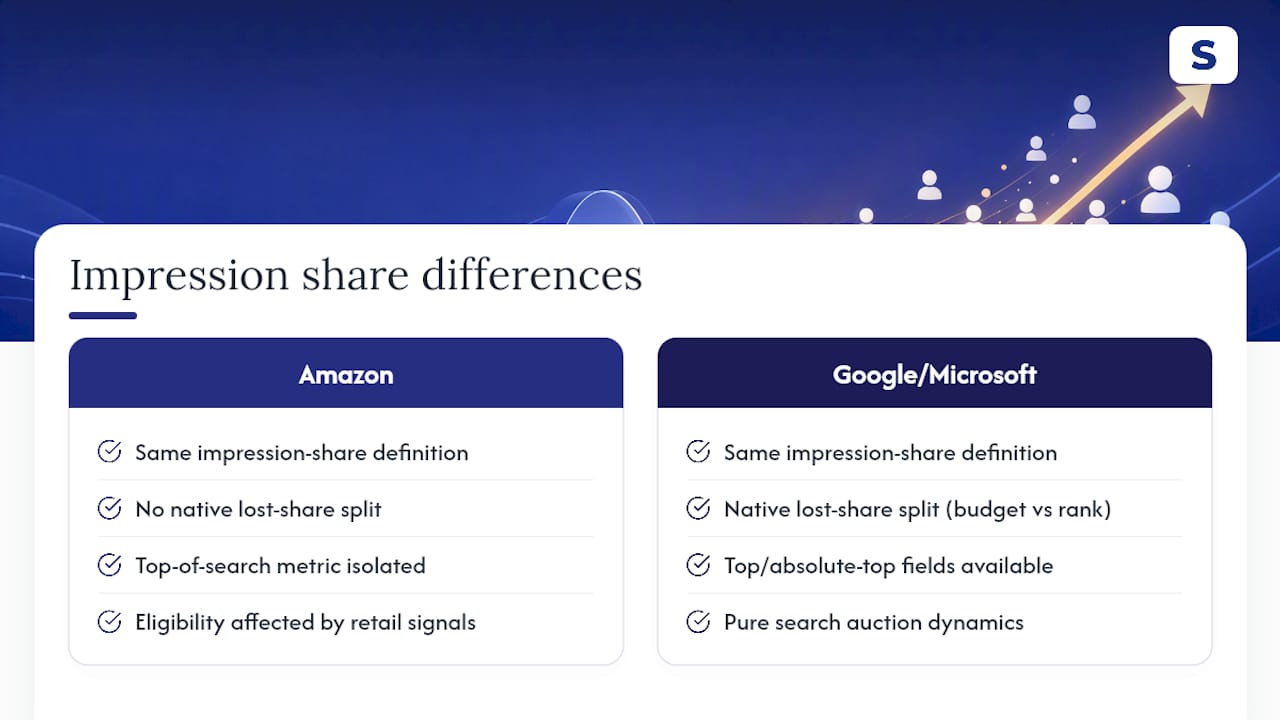
Conceptually, no. Google Ads, Microsoft Advertising, and Amazon all define impression share the same way: impressions received divided by impressions you were eligible for. The math is identical across platforms.
The differences show up in what drives eligibility and how granular the reporting gets. Google Ads breaks lost impression share into “lost to budget” and “lost to rank” at the campaign level, giving advertisers a direct diagnostic split inside the standard interface. Amazon doesn’t hand you that breakdown natively. You have to infer whether a low SIS score is a bid problem or a budget problem by cross-referencing your budget utilization against your bid competitiveness yourself.
Amazon also layers in a placement-specific metric, top-of-search impression share, that most other platforms don’t isolate the same way. Google has top and absolute top impression share fields, but Amazon’s version is tied tightly to a retail search results page where the “top of search” real estate has outsized influence on conversion, since shoppers on Amazon are typically closer to a purchase decision than someone typing a query into a general search engine. That context changes how much weight top-of-search share should carry in your optimization priorities compared to, say, a display or search campaign built for upper-funnel awareness.
Auction dynamics also differ because Amazon is a retail platform first. Your organic ranking, review count, and Buy Box status all interact with your ad’s eligible impression pool in ways a purely informational search query never has to account for.
What Are the Limits of Impression Share as a Metric?
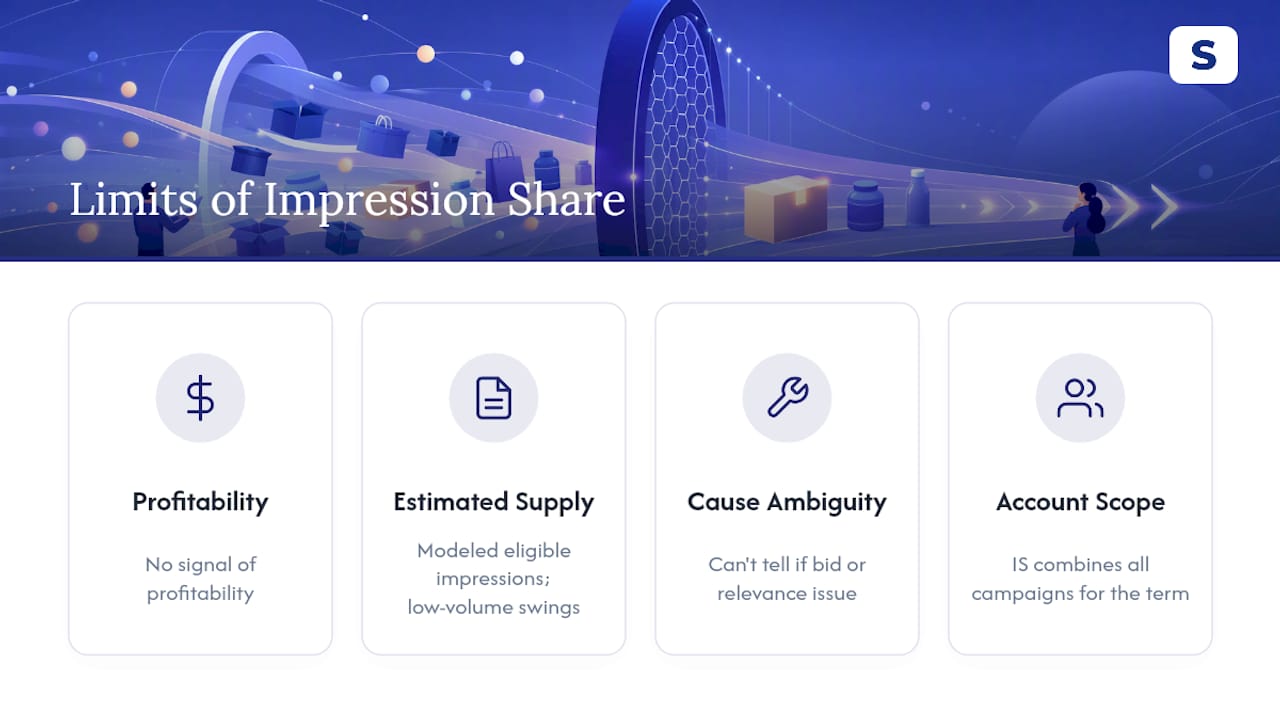
Impression share tells you nothing about profitability on its own, and treating it as a proxy for campaign health is where a lot of advertisers go wrong.
The eligible impressions figure underneath every SIS calculation is modeled by Amazon, not directly observed, so it carries estimation error, especially on low-volume search terms where a handful of extra auctions can swing the percentage by double digits day to day. That volatility makes short look-back windows unreliable and can make a stable campaign look erratic when nothing has actually changed.
Impression share also can’t distinguish between a bid problem and a relevance problem. A low score might mean you’re bidding too low, or it might mean Amazon’s algorithm doesn’t consider your listing a strong match for that query regardless of what you bid, and no report column tells you which one you’re looking at. You have to diagnose that yourself by checking your organic rank and listing content for the term.
Finally, impression share is account-scoped for a given search term, not campaign-scoped. If you run three campaigns targeting the same keyword, the SIS report reflects your combined presence, which can mask one campaign under-performing while another compensates.
How Does Impression Share Relate to Click Share and Conversion Rate?
Impression share, click share, and conversion rate form a funnel, and reading them together tells a story that no single metric can tell alone. Impression share measures whether you show up. Click share measures whether, once you show up, shoppers choose your ad over the alternatives on the page. Conversion rate measures whether the shoppers who clicked actually bought.
A gap between impression share and click share usually points to a listing problem, not a bidding problem.
A gap between click share and conversion rate points further down the funnel, toward your product listing page itself, pricing relative to comparable products, or stock availability. High visibility with high clicks but weak conversion is often the clearest signal that the ad is doing its job and the listing isn’t.
The practical implication is that impression share should never be optimized in isolation. Raising it without checking whether click share and conversion rate hold steady is how ACoS creeps upward while the account “looks” more visible on paper. For a fuller look at how visibility gains interact with margin, Selloop’s guide on increasing Amazon profit margin with AI PPC walks through where that tradeoff typically breaks down.
What Does Impression Share Optimization Look Like in Practice?
Picture a mid-size kitchenware seller launching a new product line during a competitive shopping season.
Rather than raising the base keyword bid across the board, the fix is a targeted placement bid adjustment aimed only at top-of-search, paired with a 21-day monitoring window. Over that period, top-of-search impression share climbs while CTR on that placement improves, since shoppers see the ad in the highest-visibility slot rather than lower on the page. ACoS stays within the seller’s threshold because the bid increase was scoped narrowly rather than applied to every placement.
A second, more common scenario: a seller with many keywords sitting below a low impression share assumes every one needs a bid increase. Sorting those keywords by historical conversion rate reveals that many of them convert poorly, meaning the low share is actually saving money, not costing it. Only the keywords with strong conversion history get the bid treatment. That prioritization step, ranking by conversion potential before touching bids, is what separates a deliberate impression share strategy from a reactive one that chases every low percentage in the report.
Why Impression Share Deserves a Seat at the Executive Table
Most PPC conversations stay stuck on ACoS and ROAS because those numbers map directly to spend, and finance teams understand spend. But impression share is a leading indicator. A campaign losing visibility today shows up as lost sales weeks from now, long after the auction has already moved on without you.
A one-page dashboard pairing SIS and top-of-search IS alongside ACoS gives a far more honest read on whether growth is coming from real demand or from a shrinking pool of competitors. Selloop’s data supports treating visibility metrics as inputs to executive reporting, not as a separate PPC-team concern. A product launch with rising ACoS but climbing impression share is often healthy; the reverse combination is the one that should worry a board.
— Selloop
How Selloop Helps You Act on Impression Share Data Without the Spreadsheet Work
Reading an SIS report is one thing. Knowing which of the twenty flagged keywords actually deserve a bid change, and then tracking whether that change worked, is where most sellers lose the afternoon.
Selloop pulls impression share, rank, CTR, and ACoS together automatically and flags exactly which campaigns are losing visibility for a bid reason versus a budget reason, with the data behind each recommendation shown plainly instead of buried in a spreadsheet tab. Once you approve a change, Selloop applies it and tracks the result over its 21 day window automatically, so you know within three weeks whether that placement bid adjustment actually moved top-of-search share without wrecking your margin.
Sellers use it to catch wasted spend on low-converting terms while reallocating that budget toward keywords where more impression share genuinely pays off, with campaign health scoring flagging trouble before ACoS spirals. If you manage Sponsored Products campaigns and want visibility gains you can actually prove, start a free trial with Selloop and let the first 21 day cycle show you what’s working.