Use Dynamic Bids — Down Only for most Sponsored Products campaigns. It’s the safest default because Amazon can only pull your bid back when a click looks unlikely to convert, never push it higher, so your base bid stays the real ceiling on cost.
Dynamic Bids — Up and Down earns its place only on mature, non-branded campaigns with a solid conversion history, where you’re deliberately trading some ACoS risk for more top-of-search visibility. Amazon can raise that bid by up to 100% for top-of-search placements and up to 50% elsewhere, and that math adds up fast if the listing behind the click isn’t ready to convert.
Two things to check before you touch this setting:
- Your listing converts well already. Sending Amazon permission to bid more aggressively on a page with weak images, thin reviews, or a shaky buy box just burns budget faster.
- You’re past the learning period. Campaigns need real conversion data before the algorithm’s aggression is actually informed rather than a guess.
Key Takeaways
Dynamic Bids — Down Only should be the default for most Amazon campaigns, with Up and Down reserved for mature, non-branded campaigns tested over a fixed window.
| Point | Details |
|---|---|
| Default to Down Only | It caps your bid at the amount you set and only ever discounts, never raises, the cost of a click. |
| Know the ceilings | Up and Down can raise bids up to 100% at top-of-search and up to 50% elsewhere, and placement modifiers stack on top. |
| Match strategy to campaign job | Branded defense and new campaigns favor Fixed or Down Only; mature non-branded growth campaigns are the best fit for Up and Down. |
| Test on a fixed schedule | Change one variable and set a stop-loss ACoS threshold before you start. |
| Let Selloop track the result | Selloop scores campaign health, flags wasted spend, and measures the impact of any bid change with a day 8 and a day 15 verdict. |
Table of Contents
- What Is Dynamic Bidding on Amazon? Down Only, Up and Down, and Fixed Bids
- How High Can Amazon Raise Your Bid With Dynamic Bidding?
- Which Bidding Strategy Fits Which Campaign Job?
- How to Test a Bidding Strategy Change Without Wrecking Your ACoS
- What Goes Wrong When Sellers Enable Up and Down Too Early
- A Way to Test Dynamic Bidding Changes
- Does Dynamic Bidding Change Your Click-Through Rate and Conversion Rate?
- Dynamic Bidding vs. Manual Bidding: Which Gives You More Control?
- How Should Dynamic Bidding Fit Into Your Ad Budget Management?
- How Does Amazon’s Machine Learning Decide When to Adjust a Bid?
- Why Campaign-Job-First Thinking Beats “Set It and Forget It”
- Let Selloop Tell You Which Campaigns Are Ready for Dynamic Bidding
- Sources
What Is Dynamic Bidding on Amazon? Down Only, Up and Down, and Fixed Bids
Amazon Ads gives you three bid strategies for Sponsored Products, and each one changes how much control you hand over at auction time.
Dynamic Bids — Down Only lets Amazon lower your bid in real time when a click seems less likely to convert. Your set bid is the maximum you’ll ever pay; Amazon can only discount it, never raise it. This is the conservative option and the one Amazon’s own bidding documentation treats as the default for most advertisers.
Dynamic Bids — Up and Down goes further both directions. Amazon can still lower your bid on weak-looking clicks, but it can also raise it when a click looks likely to convert, up to those documented ceilings. It’s the more aggressive setting, built for chasing incremental sales rather than protecting spend.
Fixed Bids removes Amazon’s real-time judgment entirely. You set the bid, and that’s what gets used in the auction regardless of how promising or weak the click looks. No automatic adjustment up or down.
The practical difference comes down to who’s steering: with Fixed, you are; with Down Only, Amazon has limited defensive discretion; with Up and Down, Amazon has real offensive discretion too.
How High Can Amazon Raise Your Bid With Dynamic Bidding?
The ceilings are specific and worth memorizing. Amazon can increase a bid by up to 100% for top-of-search placements and up to 50% for all other placements when Dynamic Bids — Up and Down is active.

Pro Tip: Run the math before you flip the switch. A $1.00 base bid on Up and Down could hit $2.00 for a top-of-search auction, and Amazon’s own guide to the strategy tells sellers to expect scenarios where they effectively pay double the bid amount they set.
What catches sellers off guard is how placement modifiers stack on top of that dynamic increase rather than replacing it. If you’ve set a 50% top-of-search placement modifier and Amazon also applies its own dynamic uplift, the two compound, and placement modifier stacking is a documented reason CPCs run higher than advertisers expect.
That sequencing explains a lot of the “why is my CPC so much higher than my bid” confusion in Campaign Manager:
- Base bid sets the floor.
- Placement modifier applies its own percentage on top.
- Dynamic uplift (if Up and Down is enabled) can add further, up to the 100%/50% ceilings.
Check your placement modifiers whenever actual CPC looks disconnected from the bid you remember setting. It’s usually not a glitch. It’s two multipliers working at once.
Which Bidding Strategy Fits Which Campaign Job?
Bidding strategy should follow the campaign’s purpose, not a general preference for “more automation is better.” Here’s how that breaks down in practice:
- Branded defense campaigns. Use Fixed Bids or Down Only. These campaigns already convert at a high rate on cheap, high-intent traffic. There’s no upside to letting Amazon bid you up on clicks you were already going to win.
- Conquest campaigns targeting competitor ASINs. Stick with Down Only and control aggression through placement modifiers instead of dynamic uplift. Practitioner audits of bid strategy performance by campaign type consistently find Up and Down applied here creates wasted spend early on.
- Non-branded, mature campaigns with real conversion history. This is where Up and Down earns consideration, once you have enough data to trust the algorithm’s judgment calls.
- New campaigns, auto campaigns, and product launches. Default to Down Only or Fixed. You need clean signal before you can afford to give Amazon more room to spend.
Pro Tip: Segment your top 20 campaigns by spend, tag each one by job (branded, conquest, discovery, growth), and you’ll usually find that only a handful qualify for Up and Down at any given time.
How to Test a Bidding Strategy Change Without Wrecking Your ACoS
Treat a bid strategy switch like any other controlled experiment, not a set-and-forget toggle.
- Change one variable at a time. Don’t switch bid strategy and raise budgets and add new keywords in the same week.
- Pick a handful of representative campaigns rather than flipping the whole account at once.
- Record baseline ACoS, CPC, conversion rate, and top-of-search impression share before you make the change.
- Bid behavior takes time to stabilize as Amazon’s algorithm gathers fresh conversion signal under the new setting.
While the test runs, watch these consistently:
- ACoS and CPC trends against your recorded baseline
- Conversion rate, since a drop here usually means the extra spend isn’t buying quality traffic
- The Targeting Report, to see which specific keywords or ASINs are absorbing the uplift
- New-to-brand rate, especially on discovery and conquest campaigns
Set a stop-loss threshold going in. If ACoS climbs past a level you defined beforehand, roll back to Down Only rather than waiting out the full window. Selloop’s Amazon PPC bidding strategy guide walks through this kind of staged testing in more detail if you want a template to follow.
What Goes Wrong When Sellers Enable Up and Down Too Early
The single most common mistake is flipping every campaign to Up and Down because it sounds like the more advanced, “set it and let the algorithm work” option. It isn’t. It’s a deliberate trade of control for potential reach, and it only pays off under the right conditions.
Enabling it during the learning phase is the biggest failure mode: the algorithm doesn’t yet have enough conversion history, so it bids aggressively on impressions that haven’t proven anything. Stacking high placement modifiers on top of Up and Down compounds the risk further, and a weak listing (poor images, thin reviews, an unstable buy box) means the extra spend buys clicks that were never going to convert regardless of position.
Run this check before you enable it on any campaign:
- Listing conversion rate is already solid, not aspirational
- Inventory can support a spend increase without stocking out mid-campaign
- Pricing and buy box status are stable
- Review count and rating support the traffic you’re about to send
Keep base bids conservative, cap placement modifiers instead of stacking them freely, and segment by campaign job before you decide anything. Selloop’s guide on reducing wasted Amazon ad spend covers the recovery side if you’ve already let this run longer than you should have.
A Way to Test Dynamic Bidding Changes
- Record baseline ACoS, CPC, conversion rate, and spend before the change goes live.
- Apply the change to a defined set of campaigns, not the whole account.
- Track campaign health scoring and wasted-spend flags across the full window rather than checking daily and reacting to noise.
A change that looks good on day 4 and bad on day 4 again a week later isn’t a trend. It’s noise. The only way to know if a bid strategy switch actually worked is to hold the comparison window fixed and resist the urge to judge it early.
Keep changes if ACoS held steady or improved and conversion rate didn’t drop. Scale the approach to similar campaigns if the pattern repeats. Revert immediately if ACoS climbed past your stop-loss threshold, regardless of how close you are to the next check.
Does Dynamic Bidding Change Your Click-Through Rate and Conversion Rate?
Dynamic bidding affects click-through rate mostly through placement, not through the ad itself. When Up and Down pushes your bid higher, you tend to win better ad real estate, particularly top-of-search slots that get more visibility per impression. More visible placement usually means a higher CTR, simply because more people see the ad in a position they actually scroll past.
Conversion rate is a different story, and this is where sellers get tripped up. Dynamic bidding doesn’t make your listing convert better. It changes which clicks you’re paying for and how much you pay for them. If Amazon’s uplift is winning you traffic that was always going to convert at your existing rate, you’ll see volume grow while conversion rate holds steady. If the uplift is buying marginal placements or audiences with weaker intent, conversion rate can quietly slide even while sales volume ticks up, because you’re diluting good traffic with mediocre traffic.
That’s why watching conversion rate in isolation matters more than watching sales growth alone. A campaign can look like a win on total orders while actually converting worse per click than it did before you enabled Up and Down. Pull the Targeting Report and compare conversion rate by keyword or placement before and after the change, not just the account-level average, since averages hide exactly this kind of dilution.
Dynamic Bidding vs. Manual Bidding: Which Gives You More Control?
“Manual bidding” on Amazon usually means Fixed Bids paired with hands-on bid adjustments you make yourself based on performance data. Dynamic bidding, whether Down Only or Up and Down, hands some or all of that real-time judgment to Amazon’s algorithm.
Fixed Bids give you total predictability. What you set is what gets used, full stop. The cost is that you’re the one who has to notice underperforming keywords and adjust, which means gaps between your review cycles where a keyword bleeds spend without you catching it.
Down Only splits the difference. Amazon can protect you from paying full price on weak clicks, but it can never surprise you with a higher bill than your base bid allows. It’s the closest thing to manual bidding’s predictability with a small automated safety net layered on top.
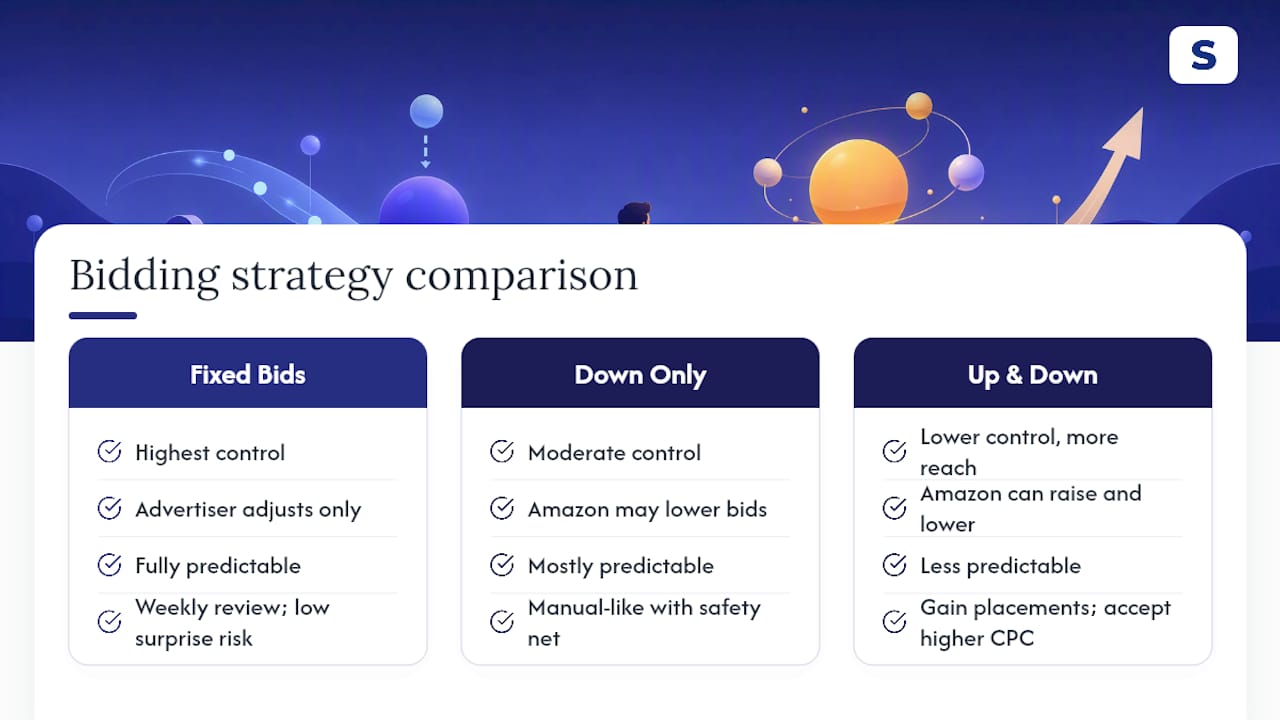
Up and Down trades predictability for reach. You get access to placements and impressions a fixed bid might lose the auction for, but you’re accepting that your actual CPC can run meaningfully above what you set, potentially double the base bid according to Amazon’s own guide.
Neither approach is universally correct. Manual control suits sellers with the time to review bids weekly and a low tolerance for cost surprises. Dynamic strategies suit sellers who’d rather set guardrails and let volume find its level within them, provided the guardrails are set correctly in the first place.
How Should Dynamic Bidding Fit Into Your Ad Budget Management?
Dynamic bidding and budget management have to work together, or the budget becomes the thing quietly absorbing every bidding decision you make.
Start by sizing daily budgets to your bid strategy, not the other way around. A campaign on Up and Down with a $1.00 base bid needs headroom for CPCs that can run close to double that on strong placements. Setting the daily budget as if every click will cost exactly $1.00 guarantees you’ll hit budget caps early in the day and miss afternoon and evening traffic entirely.
Segment budget allocation by campaign job the same way you segment bid strategy. Branded defense campaigns on Fixed or Down Only tend to have predictable, lower CPCs, so they need less budget cushion. Growth campaigns on Up and Down need more slack built in, because that’s exactly where the uplift is designed to spend more when it sees a good opportunity.
Review budget utilization alongside ACoS, not instead of it. A campaign that’s hitting its daily budget cap by noon every day is either underfunded for its bid strategy or overperforming enough to justify a bigger budget. Both conclusions require checking ACoS before you act, since raising budget on a campaign that’s already running hot on cost just multiplies the problem.
How Does Amazon’s Machine Learning Decide When to Adjust a Bid?
Amazon’s dynamic bidding algorithm makes its real-time call using signals tied to the specific auction: the shopper’s likely intent based on search context, the historical conversion performance of similar impressions, and the competitive density of that particular auction at that moment.
This is exactly why campaign maturity matters so much. A campaign with weeks of conversion history gives the algorithm a rich signal to work from. It can distinguish, with some confidence, which impressions look like past converters and which don’t. A brand-new campaign has none of that history, so the algorithm is essentially guessing, and an aggressive Up and Down setting turns that guess into real spend.
The model doesn’t know your margins, your inventory position, or your actual profitability targets. It optimizes toward the outcome the bidding strategy is configured for, which is winning likely-to-convert clicks within the ceilings you’ve allowed, not maximizing your ACoS discipline. That distinction is why “let the algorithm handle it” isn’t a strategy on its own. It’s a setting that still needs a human deciding when it’s appropriate to turn on.
Why Campaign-Job-First Thinking Beats “Set It and Forget It”
The evidence here points to one conclusion that gets buried in most bidding advice: the strategy question isn’t “which setting is best,” it’s “what job is this campaign doing.” A branded defense campaign and a non-branded growth campaign have almost nothing in common in terms of risk tolerance, so treating them the same way with the same bid strategy is where most wasted spend originates.
Conventional advice tends to frame Up and Down as the “advanced” or “optimized” setting, implying sellers should graduate to it. That framing is backwards. Down Only isn’t a beginner setting you outgrow. It’s the correct permanent home for a large share of any account’s campaigns, and Up and Down is a targeted tool for a specific job, not an upgrade path.
If you take one thing from this, prioritize building the habit of tagging every campaign by its purpose before you touch its bid strategy. Then test changes on a fixed calendar, long enough to see past the noise, with a stop-loss rule decided in advance rather than a gut call made mid-decline. The sellers who get this right aren’t the ones with the most aggressive settings. They’re the ones who know exactly why each campaign is set the way it is.
— Selloop
Let Selloop Tell You Which Campaigns Are Ready for Dynamic Bidding
Figuring out which of your campaigns qualify for Up and Down, and which are quietly bleeding budget on the wrong setting, usually means digging through weeks of reports by hand. Selloop replaces that spreadsheet work with a campaign health score and wasted-spend detection that flags exactly which bids and keywords need attention, with the data behind each recommendation shown plainly.
Choose a conservative, balanced, or aggressive optimization profile depending on how much control you want to keep, and Selloop applies suggested bid and keyword changes with one click once you approve them. Start a free trial at Selloop and review the verdicts on the campaigns you've been meaning to check.
Sources
- Bidding strategies for Sponsored Products
- Amazon Sponsored Products Bid Strategy 2026: Dynamic Up-and-Down vs Down-Only vs Fixed, And Which One Wins By Campaign Type - Velocity Sellers