
Sponsored Display audiences let Brand-Registered advertisers reach and retarget shoppers on and off Amazon using pre-built segments like In-market, Interests, Lifestyle, and Life Events, plus your own views and purchase history. The single best first move is launching a views retargeting campaign at the 7 and 30-day windows before touching broader audience types.
TL;DR:
- Running a views retargeting campaign for 7 and 30 days is the most effective way to measure initial results before expanding to broader audience types.
- Prioritize Amazon Brand Registry enrollment to unlock audience targeting features like In-market, Interests, Lifestyle, and Life Events segments.
- Start testing with high-intent windows, then gradually expand to longer and off-Amazon placements as appropriate.
- Avoid combining retargeting and discovery audiences in one ad group to prevent bidding inefficiencies and misaligned intent targeting.
- Track key KPIs such as ROAS, ACoS, conversion rate, reach, and frequency separately for placement and audience type to identify underperforming segments quickly.
Table of Contents
- What Are Sponsored Display Audiences and How Do They Differ?
- How Do You Create a Sponsored Display Audiences Campaign?
- What Are the Best Retargeting Windows for Sponsored Display?
- Should You Enable Off-Amazon Placements for Sponsored Display?
- How Do You Optimize Bids and Creative for Sponsored Display?
- What KPIs Should You Track for Sponsored Display Campaigns?
- How Do You Fix Common Sponsored Display Mistakes?
- What Should You Check When Testing Sponsored Display?
- How Should Sponsored Display Fit Into Your Overall Amazon Ad Strategy?
- Cut the Manual Work From Your Testing Workflow
- Sources
What Are Sponsored Display Audiences and How Do They Differ?
Sponsored Display audiences split into two categories: Amazon’s pre-built segments and your own retargeting pools built from shopper behavior. The pre-built segments come from Amazon’s first-party shopping and streaming data, organized into four groups: In-market, Lifestyle, Interests, and Life Events. Retargeting audiences, by contrast, are built from people who already viewed or purchased your products.
That distinction matters for how you use each one. Pre-built segments help you find new shoppers who haven’t interacted with your listings yet. Retargeting audiences bring back people who already showed intent. Here’s how each pre-built type actually works:
- In-market audiences target shoppers actively browsing or purchasing in a specific product category right now. Use these for discovery when you want to reach people who are close to a buying decision, such as someone browsing “running shoes” in the last 30 days.
- Interests audiences target shoppers based on longer-term browsing patterns tied to a category or hobby. These fit consideration-stage campaigns better than hard discovery, since interest doesn’t always mean an imminent purchase.
- Lifestyle audiences group shoppers by broader behavioral patterns, like frequent outdoor gear buyers or home cooking enthusiasts. They work well for cross-sell campaigns where you’re introducing a complementary product to an existing customer profile.
- Life Events audiences target shoppers around major moments, such as moving, having a baby, or getting married. These fit seasonal or milestone-driven products and tend to convert best when your creative speaks directly to that moment.
- Advertiser audiences (your own views and purchase retargeting) target people who’ve already engaged with your ASINs. This is where most advertisers should start, since intent is already established.
One requirement trips up a lot of sellers: Sponsored Display audience targeting is only available to advertisers enrolled in Amazon Brand Registry. If you’re not enrolled, you can still run product targeting, but the audience taxonomy for audience targeting remains unavailable.
How Do You Create a Sponsored Display Audiences Campaign?
The structure follows the same logic as most Amazon ad products: campaign, then ad group, then targeting. Where Sponsored Display gets specific is in the target clause step, where you actually pick your audience segment.
- Set campaign-level basics. Choose your objective (usually “brand awareness and reach” for discovery, or “consider” for retargeting), select placements, and set a daily budget. For a first test, budget conservatively and use dynamic bidding “down only” to avoid overpaying during the learning window.
- Build the ad group and attach ASINs. Link the specific products you want advertised, using creative that matches lifestyle imagery for discovery audiences and clear product benefit callouts for retargeting.
- Add your target clause. This is where you select the actual audience: for example, “Views retargeting, 30 days” or “In-market: fitness equipment.” Amazon’s Sponsored Display audiences API documents the taxonomy discovery endpoints if you’re automating this at scale.
- Name campaigns for testing clarity. Use a naming convention like “SD_Views7d_Test_ASIN123” versus “SD_InMarket_Control_ASIN123” so you can pull segmented reports later without guessing what each line item was testing.
- Set exclusions and frequency caps. Exclude existing customers from discovery audiences when the goal is new-to-brand reach, and cap frequency to avoid burning impressions on the same shopper repeatedly.
Structure your first test with two buckets: one campaign running views retargeting alone, and a separate control campaign running a broader audience like In-market. Keep budgets even between them so the comparison is fair, and resist the urge to change bids mid-test.
Pro Tip: Don’t mix retargeting and discovery audiences in the same ad group. They have completely different intent levels, and Amazon’s bidding system can’t optimize well when you’re asking it to chase two different behaviors at once.
What Are the Best Retargeting Windows for Sponsored Display?
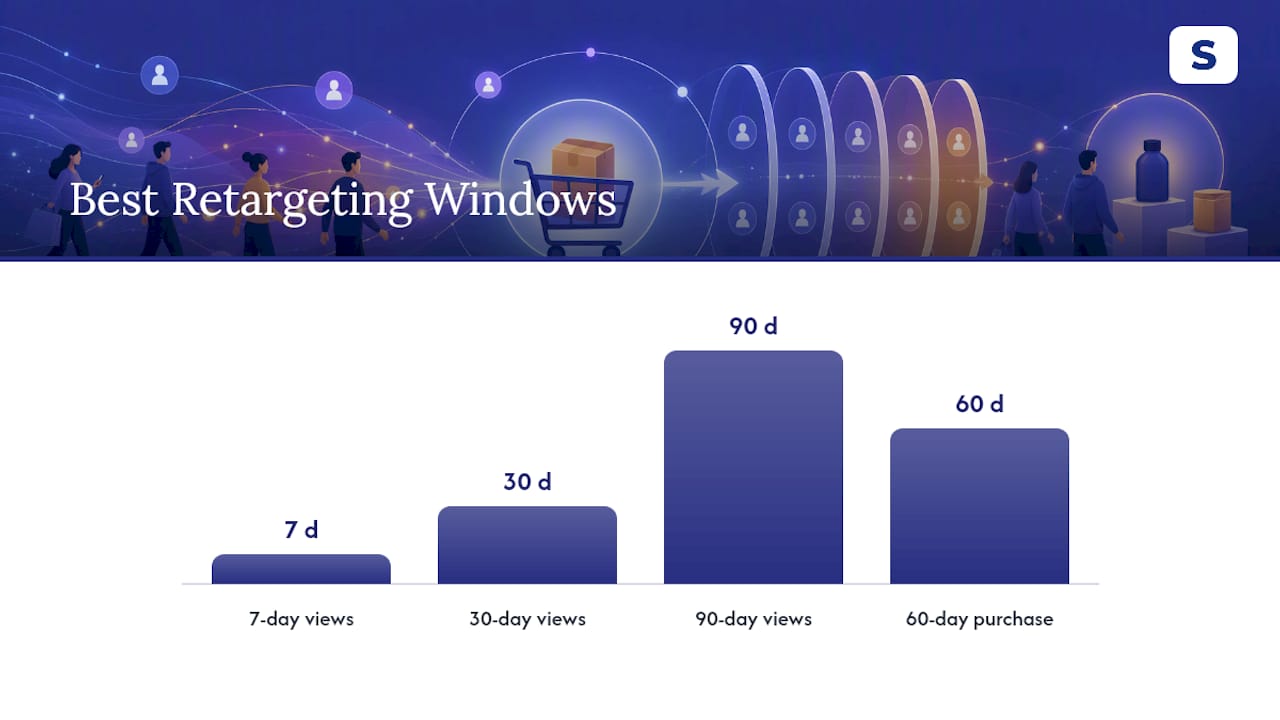
Amazon’s views retargeting typically offers several window options, such as shorter and longer lookback periods, and purchase retargeting offers its own separate window. Check the current options in your campaign manager, since Amazon can adjust these over time. Each window captures a different point on the intent curve, and picking the wrong one is one of the most common ways advertisers waste budget on this ad type.
- 7-day views retargeting catches shoppers who looked at your product very recently. This is your highest-intent, highest-converting window, and it should be the first thing you test.
- 30-day views retargeting widens the pool to people who browsed a month ago. Conversion rates typically drop compared to the 7-day window, but so does cost, since you’re reaching more people with less recency bias.
- 90-day views retargeting is the broadest window and works best for products with long consideration cycles, like furniture or electronics, where a month-old browse session still represents real intent.
- Purchase retargeting targets people who already bought from you or a related ASIN, making it a strong tool for cross-sell and replenishment campaigns. Check your campaign manager for the exact lookback window currently available, since Amazon can adjust these over time.
Check performance daily, but don’t make bid changes before day 7. Amazon Ads and most experienced practitioners recommend mastering views retargeting before expanding into broader segments, and the data backs that sequencing.
Once you start changing bids, take a first read from day 8 and a fuller one from day 15; those are the same checkpoints Selloop uses to judge the Sponsored Products changes you apply through it.
Should You Enable Off-Amazon Placements for Sponsored Display?
Extending your Sponsored Display campaigns to off-Amazon inventory can meaningfully increase total reach. That’s a meaningful jump, but it comes with a catch: off-Amazon placements often carry higher CPCs than on-Amazon inventory, and the traffic quality can vary more.
On-Amazon placements show your ads on product detail pages, the Amazon homepage, and search results, where shoppers are already in a buying mindset. Off-Amazon placements push your ads onto third-party publisher sites and apps, and in some cases video platforms like Twitch, where Amazon’s DSP infrastructure extends its reach outside its own ecosystem.
Here’s how to decide which placements make sense for your campaign:
- Enable off-Amazon placements when reach is the goal, particularly for new product launches or Life Events audiences where you’re trying to build broad awareness rather than immediate conversion.
- Keep placements on-Amazon only during early retargeting tests, since you want a clean read on conversion efficiency before adding a variable that changes your CPC baseline.
- Segment your reports by placement before drawing conclusions. A campaign that looks weak on blended ACoS might actually have strong on-Amazon performance dragged down by a smaller, pricier off-Amazon slice.
- Watch downstream conversions, not just click-through rate, since off-Amazon traffic often takes longer to convert and can undercount if you’re only checking same-day results.
Treat off-Amazon as a reach extension you layer in after your core retargeting campaigns prove out, not as your default setting from day one.
How Do You Optimize Bids and Creative for Sponsored Display?
Bid strategy for Sponsored Display should track directly with audience intent. The tighter the intent, the more room you have to bid aggressively, because conversion probability is higher and wasted spend is lower.
- Bid higher on views and purchase retargeting since these audiences already know your product and convert at better rates than cold traffic.
- Bid conservatively on In-market and Interests audiences during the first two weeks, then adjust once you have enough data to see which segments actually convert.
- Use lifestyle imagery for discovery audiences and product-benefit-focused creative for retargeting, since a shopper who already viewed your listing needs a reminder of value, not an introduction.
- Avoid urgency language (“Sale ends today!”) on Lifestyle and Life Events audiences, since these shoppers are earlier in their decision process and aggressive CTAs tend to underperform there.
- Layer audiences carefully and use negative audiences to prevent your retargeting and discovery campaigns from competing for the same impression, which inflates your internal auction costs without adding incremental reach.
Programmatic display best practices generally support this approach: layered targeting and incremental lift measurement outperform flat, single-audience campaigns, and that principle holds true inside Amazon’s own display ecosystem.
Pro Tip: Scale budget on a campaign only after it shows stable ROAS across two consecutive test periods, not one. A single strong period can be noise. Two in a row is a pattern. For bid mechanics specific to Sponsored Products and Sponsored Display together, a deeper Amazon PPC bidding strategy breakdown covers the adjustment logic in more detail.
Pause underperforming campaigns once you’ve confirmed the drag isn’t just an off-Amazon placement skewing blended numbers. If ACoS stays high after isolating placements, the issue is likely audience fit or creative, not the channel itself.
What KPIs Should You Track for Sponsored Display Campaigns?
Six metrics tell you almost everything you need to know: ROAS, ACoS, conversion rate, view-through conversions, reach, and frequency. Track them separately by placement and audience type, because blending them hides where your budget is actually working.
- ROAS and ACoS give you the profitability baseline, but only compare them within the same audience type. A 7-day retargeting ACoS of 15% and a Lifestyle audience ACoS of 40% aren’t a failure of the second campaign. They’re different jobs.
- Conversion rate tells you how well your creative and audience match, independent of spend.
- View-through conversions matter more for display than for search ads, since a shopper might see your ad, not click, and still purchase later. Missing this metric undercounts display’s real contribution.
- Reach and frequency show whether you’re finding new shoppers or hammering the same small pool repeatedly. Rising frequency with flat reach is a signal to refresh creative or expand your audience.
Segment every report by placement (on-Amazon vs. off-Amazon) and by audience window before drawing conclusions, since mixing the two obscures whether higher costs come from placement or from targeting. A dedicated Amazon ad tracking setup makes this segmentation far less painful than pulling it manually every week.
For experiment rules, treat the first 7 days as a warm-up period where Amazon’s algorithm is still calibrating delivery, and take a first read from day 8 and a fuller one from day 15 before making a verdict. Early signals during that first week are directional, not conclusive.
How Do You Fix Common Sponsored Display Mistakes?
Most underperforming Sponsored Display campaigns trace back to one of four issues, and all four are fixable in under 15 minutes once you know what to check.
- Audience overlap. If your views retargeting and In-market campaigns target the same ASINs without exclusions, you’re bidding against yourself. Add exclusions so each campaign owns a distinct audience.
- Starting with discovery too early. Jumping straight to In-market or Lifestyle audiences before testing retargeting usually produces a weaker early ROAS, since views retargeting captures the highest-intent traffic first. Roll back to retargeting, prove the baseline, then expand.
- Misreading off-Amazon CPCs. A CPC spike after enabling off-Amazon placements isn’t automatically bad. Check downstream conversions before pulling back spend.
- Creative mismatch. Urgency-driven creative on Lifestyle or Life Events audiences, or generic lifestyle imagery on a retargeting campaign, both underperform. Match the message to the intent stage.
Run this quick audit: pull your recent data, split by placement, split by audience type, check for ASIN overlap across campaigns, and confirm frequency caps are active. Most problems surface in that first pass.
What Should You Check When Testing Sponsored Display?
Platforms exist that analyze Amazon PPC campaigns for high-spend, low-return patterns such as overlapping targets, mistimed windows, or creative mismatched to intent stage.
Some AI-driven audits scan multiple campaigns at once, flag those burning budget without return, and provide data-justified reasons for recommendations rather than black-box scores. The goal isn’t replacing judgment. It’s cutting the hours spent digging through spreadsheets to find what’s actually broken.
How Should Sponsored Display Fit Into Your Overall Amazon Ad Strategy?
Sponsored Display audiences work best as the closing argument in a funnel that starts with Sponsored Brands for awareness and runs through Sponsored Products for high-intent search conversion. Display fills the gap those two miss: shoppers who saw your product but didn’t buy on the first pass.
Prioritize retargeting depth over audience breadth until your core windows are proven. A campaign running three well-tuned retargeting segments will usually outperform one spread thin across five broad discovery audiences with no baseline. Display also isn’t a channel to run in isolation. Treat it as connective tissue between your top-of-funnel spend and your conversion-stage campaigns, not a separate budget line competing for credit.
— Selloop
Cut the Manual Work From Your Testing Workflow
Everything in this guide, from picking the right retargeting window to segmenting reports by placement, takes real hours every week if you’re doing it by hand across multiple campaigns. Some tools reduce time spent by scanning your campaigns, flagging those burning budget without return, and attaching clear, data-backed reasons to recommendations.
Selloop’s recommendations cover Sponsored Products only, and each one is applied only when you click to apply it. The AI just tells you where to look first.