Use Dynamic Bids — Down Only as your default for Sponsored Products. Reach for Fixed Bids only for a short window when you need forced visibility, like a new launch, and save Dynamic Bids — Up and Down for proven, high-converting targets where you can absorb the ACoS risk. Everything else is a variation on that choice.
TL;DR:
- Using dynamic bids only to lower bids helps protect margins but limits visibility during competitive periods, making it unsuitable for aggressive growth.
- Testing bid strategies over 21 days by changing only one variable at a time provides a clear picture of their actual impact on ACoS, CPC, and sales.
- High CPC spikes often result from stacking placement modifiers with dynamic bid increases, so auditing placement settings can prevent unexpected costs.
- Down Only bids are best for mature campaigns with stable data, while Fixed Bids suit launches or campaigns needing predictable spend.
- Automated tools like Selloop support 21-day testing and help avoid guesswork, providing data-backed recommendations tailored to risk tolerance.
Table of Contents
- Dynamic Bids vs Fixed Bids: How Each One Actually Works
- How to Choose Between Dynamic and Fixed Bids by Campaign Stage
- How to Test a Bid Strategy Change Safely Over 21 Days
- Why Your Bids Might Be Higher Than You Think
- Where Automation Helps and Where Sellers Get Burned
- Run the 21-Day Bid Test Without Building a Spreadsheet
- Sources
- FAQ
Dynamic Bids vs Fixed Bids: How Each One Actually Works
The three bidding strategies Amazon offers for Sponsored Products don’t just differ in name. They change what Amazon is allowed to do to your bid in real time, and that difference is where most sellers get burned.
Dynamic Bids — Down Only lets Amazon lower your bid when a click looks unlikely to convert. It never raises it. If you set a $1 base bid, the actual amount charged per click will be $1 or less, depending on Amazon’s read of that auction. This is the most conservative setting on the table.
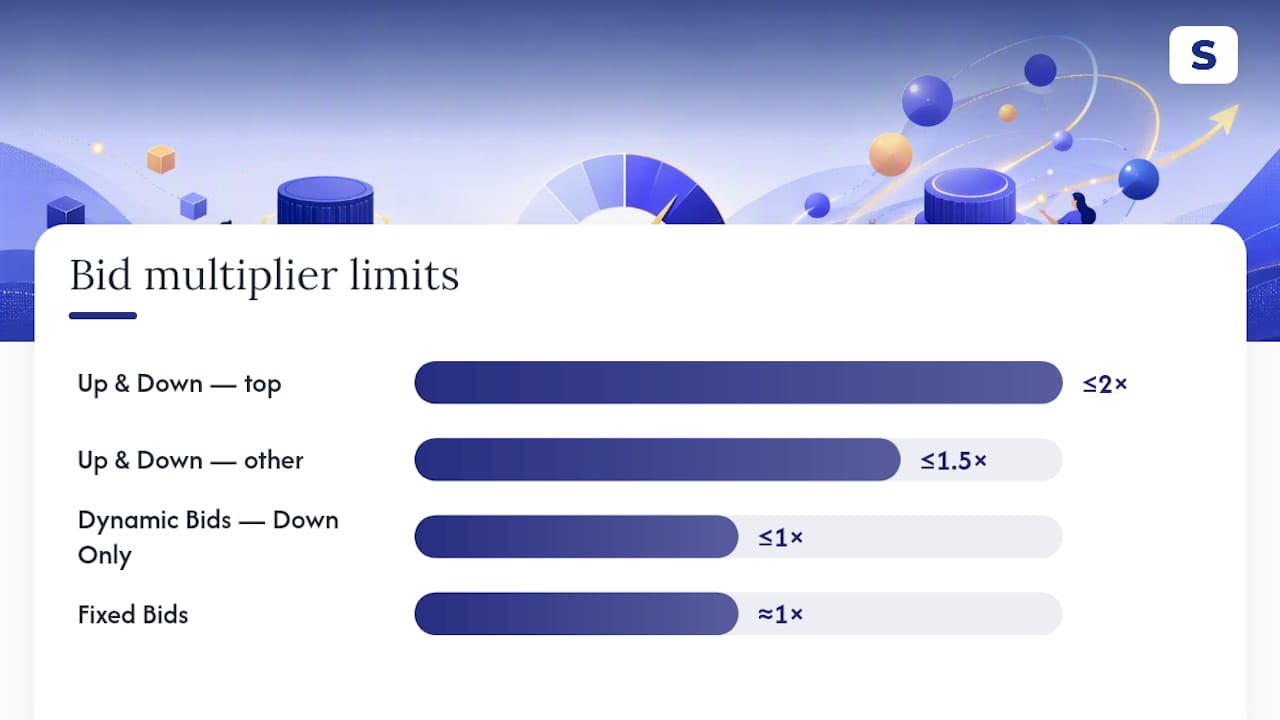
Dynamic Bids — Up and Down lets Amazon both raise and lower the bid based on conversion likelihood. Amazon can increase your bid by up to 100% for top-of-search placements and up to 50% for other placements, according to Amazon’s own bidding documentation. That $1 base bid can become a $2 bid at the top of the search page without you touching a thing.
Fixed Bids remove Amazon’s discretion entirely. You set $1, you pay at or near $1 regardless of how the algorithm rates the click’s odds. No downside protection, no upside boost. What you set is what you get.
The math that surprises most sellers: a $1 base bid under Up & Down, stacked with a placement modifier, can turn into an effective bid well north of $2 before you’ve adjusted a single keyword. That’s not a bug. It’s how the two mechanisms compound.
Here’s how the trade-offs stack up:
- Down Only protects margin and ACoS but caps how aggressively you can chase visibility during high-competition moments.
- Up and Down wins more top-of-search impressions when conversion signals are strong, but it’s an aggressive setting Amazon itself cautions against using broadly, since it can inflate ACoS fast on unproven targets.
- Fixed gives you predictable, static spend, but you get none of Amazon’s downside protection when a click is a poor match.
None of the three is universally “better.” They’re built for different jobs, and matching the job to the setting is the entire game.
How to Choose Between Dynamic and Fixed Bids by Campaign Stage
The right bidding method depends less on general theory and more on where your campaign actually sits. Ask yourself four things before touching a bid setting: how much conversion data do you have, how stable is your conversion rate, how much margin can absorb a bad week, and how sensitive is your budget to a spike.
A useful way to think about it:
- Launch stage. You have little to no conversion history. Use Fixed Bids briefly to force visibility while the listing gathers reviews and ranking signals, then shift to Down Only once you have real conversion data, typically after the first meaningful batch of clicks.
- Growth stage. Your conversion rate is stabilizing. Run Down Only as the account-wide default, and selectively test Up & Down only on the individual keywords or targets that are already converting well.
- Mature stage. You have months of consistent data. Keep Down Only as the default across the account, and treat Up & Down as a scalpel, not a scalp, reserved for your best-performing, highest-margin targets.
Watch for red flags that should trigger an immediate rollback: ACoS climbing more than a few points week over week, CPC spiking without a matching lift in conversion rate, or impressions surging on placements you never intended to bid aggressively for. Any of those means the setting you tried doesn’t fit the campaign’s current data quality.
Pro Tip: Never switch bid strategy and adjust your keyword bids in the same week. If both move at once, you won’t know which change actually caused the ACoS swing.
For sellers trying to protect margin while they scale, a PPC bidding strategy guide that walks through account-wide defaults can help you avoid guessing your way through this stage by stage.
How to Test a Bid Strategy Change Safely Over 21 Days
Run one variable at a time. If you’re testing Down Only against Up & Down, change the bid strategy only, and leave keyword bids, budgets, and targeting untouched for the full window. A 21-day period gives Amazon’s algorithm enough auction cycles to settle into a pattern rather than reacting to a single noisy week.
Split your test where possible: apply the change to one ad group or campaign and hold an identical control group on the old setting. That’s the only way to separate a real bid-strategy effect from a seasonal dip or a listing change happening at the same time.
Track these metrics daily, but judge them weekly:
- ACoS (the headline number, but never in isolation)
- Conversion rate (tells you if the traffic quality changed)
- CPC (shows whether Amazon is spending more per click)
- Impressions and CTR (reveal whether you’re winning different placements)
- Units sold and ROAS (the profitability check that matters most)
| Metric | What a good result looks like | What a rollback signal looks like |
|---|---|---|
| ACoS | Flat or improving over 21 days | Rising more than a few points with no sales lift |
| Conversion rate | Stable or improving | Dropping while CPC climbs |
| CPC | Modest, explainable increase | Sudden spike with no impression gain |
| Units sold | Growing or stable | Falling despite steady or higher spend |
If ACoS worsens without a matching jump in units sold, roll back. If it worsens but units sold and ROAS both improve, you may have found a legitimate scaling win worth keeping.
Why Your Bids Might Be Higher Than You Think
Placement modifiers and dynamic bid increases don’t operate separately. They stack. A base bid with a placement modifier and an Up & Down increase can produce an effective bid far above what your bid entry field shows, which is exactly why sellers see CPC spikes they can’t explain from the bid alone.
Run a quick audit when costs jump:
- Check your placement modifiers for top-of-search and product pages, not just your base bid.
- Pull the search term report to see which specific terms triggered the higher-cost clicks.
- Compare CPC trends by placement, not just account-wide averages, since one placement can be quietly eating your budget.
Mitigation is simpler than it sounds. Cap modifiers instead of leaving them uncapped, pair Down Only with a strong (not maximum) modifier for balanced visibility, and limit Up & Down to a narrow list of targets you’ve already proven convert well. A dayparting playbook can help you layer timing controls on top of this once the bid strategy itself is stable.
Where Automation Helps and Where Sellers Get Burned
Automation earns its keep when conversion signals are stable and someone is actually watching the results. It becomes a liability when sellers flip to Up & Down on day one of a launch, or ignore how placement modifiers quietly double their real spend.
The most common mistake isn’t picking the wrong bid type. It’s changing three things at once and never finding out which one moved the needle. Run the 21-day test, isolate the variable, and let a tool track the outcome so you’re not rebuilding a spreadsheet every Monday.
— Selloop
Run the 21-Day Bid Test Without Building a Spreadsheet
Selloop was built for exactly the kind of test this article just walked through: change one variable, track it for 21 days, and get a clear verdict backed by your own campaign data instead of a gut feeling. It flags which campaigns are burning spend on the wrong bid strategy, scores campaign health automatically, and hands you a data-justified recommendation instead of a wall of numbers to interpret yourself.
It fits sellers and agencies who run recurring ad spend and want to test bid changes without losing track of what caused what. You choose a recommendation profile, conservative, balanced, or aggressive, so the tool matches the risk tolerance you’d otherwise have to manage manually. Plans start with STARTER at $29 per month, scale to GROWTH at $99 and PRO at $249, and agencies managing multiple accounts can get custom terms. Check the pricing page and start a trial to see your own 21-day verdict on your next bid change.
Sources
For the mechanics straight from the source, see Amazon’s own bidding strategy documentation and its guide to dynamic bidding. For a practical breakdown of placement compounding, the Amazon Ads bidding strategy guide is worth a read, alongside general seller context in this Amazon FBA side hustle guide.
- Bidding strategies for Sponsored Products
FAQ
What Is Dynamic Bidding on Amazon?
Dynamic bidding is Amazon’s system for adjusting your bid in real time based on how likely a click is to convert. Down Only can lower your bid but never raise it, while Up and Down can raise it by up to 100% at the top of search and up to 50% on other placements.
What Are the Three Bid Types for Sponsored Products?
Amazon Sponsored Products offers Dynamic Bids — Down Only, Dynamic Bids — Up and Down, and Fixed Bids. Down Only only lowers bids, Up and Down can raise or lower them, and Fixed keeps your bid static regardless of conversion likelihood.
Which Bidding Method Is Better, Dynamic or Fixed?
Neither wins outright. Down Only is the safer, more efficient default for most campaigns, Fixed suits short-term visibility pushes like launches, and Up and Down works best as a targeted tool on proven, high-converting keywords rather than an account-wide setting.
Does Selloop Support Testing Different Bid Strategies?
Yes. Selloop tracks the impact of a bid strategy change over a 21-day window and shows the ACoS and conversion rate movement behind each recommendation, so you can decide whether to keep, adjust, or roll back the change.
What Causes Unexpected CPC Spikes on Amazon Ads?
The most common cause is compounding: a placement modifier and a dynamic bid increase stacking on top of each other, producing an effective bid much higher than your base bid suggests. Auditing your placement modifiers alongside your bid strategy usually reveals the source.