The most reliable setup for client reporting on Amazon Ads pulls data automatically through an API or connector, runs it through a standardized report contract, and delivers a branded output on a schedule, always with a human check before it reaches a client’s inbox. That stack has three parts: a data layer that pulls consistent numbers every time, a template that turns numbers into a story, and a review step that catches what automation misses.
TL;DR:
- Scheduled API pulls ensure reproducible reports, but account for attribution window differences to avoid mismatched numbers across periods.
- Use PDF summaries for stakeholders preferring static snapshots, and dashboards for clients seeking ongoing data exploration, matching reporting cadence to account activity.
- Rebuild all reports based on legacy report types into the new unified reporting system once Amazon confirms a firm retirement date, to maintain continuity and metric consistency.
- Incorporate human review before sending, including data completeness checks and context explanation, as automation alone cannot catch all issues or interpret anomalies.
- Standardized templates with explicit KPI definitions, attribution details, and clear action items help clients understand results, especially when measuring cross-channel or multi-touch impacts.
Table of Contents
- Choosing Client-Facing Report Formats and Outputs
- Data Sources and Integration Options for Automated Reporting
- Building an Automated Workflow With Operational Guardrails
- Report Templates and the KPIs Every Client Report Needs
- Quality Control and Human Review Before Every Send
- The 2026 Shift to Unified Reporting
- Amazon Marketing Cloud and Attribution vs. Standard Campaign Reporting
- Security and Privacy When Sharing Amazon Ads Data With Clients
- Common Challenges in Amazon Ads Client Reporting Workflows
- What Changed When We Automated Our Own Reporting Process
- How Selloop Fits Into Your Reporting Workflow
- FAQ
Choosing Client-Facing Report Formats and Outputs
A one-click PDF summary suits clients who want a monthly snapshot without logging into anything. A live dashboard suits clients who check in weekly or want to drill into their own product lines between calls. Agencies managing several accounts often run both: a scheduled PDF for the executive sponsor and a dashboard link for the day-to-day marketing contact.
An executive summary should lead with the three numbers that matter most this period, then move into two or three prioritized actions, not a wall of charts. Framing action items as “do this next” rather than “here’s what happened” keeps the conversation forward-looking.
Cadence depends on account size and spend volatility: weekly for accounts in active optimization, monthly for stable accounts, quarterly for strategic reviews with leadership.
- Use PDFs for fixed-point snapshots and stakeholders who want a finished document.
- Use dashboards for clients who want to explore data between meetings.
- Match cadence to how often spend or strategy actually changes.
- Keep branding (logo, color palette, agency name) consistent across every format a client sees.
Pro Tip: Build one template per client tier instead of one per client; it cuts maintenance time without sacrificing the personal touch.
Data Sources and Integration Options for Automated Reporting
The Reporting API v3 is the right foundation for a fully automated pipeline. You authenticate an advertiser profile, submit a report request specifying type, date range, metrics, and dimensions, poll until the report finishes processing, then download and transform the result into a dashboard, PDF, or spreadsheet. Because the request format is explicit about account, period, and columns, it supports a reproducible reporting contract: the same request, run next month, returns a comparable report.
Marketing Stream, documented alongside Amazon’s measurement and analytics tools, pushes near-real-time hourly metrics rather than waiting on a scheduled batch. It fits accounts where same-day bid or budget decisions matter; for a standard weekly or monthly client report, scheduled API pulls are usually simpler to maintain.
No-code connectors into Looker Studio or Power BI lower the technical bar: authorize the account, pick a profile, choose metrics, and schedule a refresh. The trade-off is less control over transform logic and timezone handling, which matters when a client asks why two reports show slightly different numbers for the same week.
- API v3 pulls fit scheduled, reproducible client reports.
- Marketing Stream fits accounts needing hourly or same-day signals.
- Connectors fit teams that want to skip direct API maintenance.
Marketing Stream delivers metrics on an hourly cadence through the Amazon Marketing Cloud ecosystem, which matters for anyone reporting on fast-moving campaigns rather than weekly summaries.
Building an Automated Workflow With Operational Guardrails
A dependable pipeline follows the same sequence every time:
- Define the report contract: account, date range, columns, timezone, attribution window.
- Schedule the report request through the API or connector.
- Poll for completion rather than assuming a fixed processing time.
- Download and transform the raw export into your template’s structure.
- Render the branded PDF or refresh the dashboard.
- Deliver to the internal reviewer, then to the client.
- Archive the raw export and the final report together for audit purposes.
Guardrails matter as much as the steps. Build retry logic with backoff for failed polls, flag any report pulled before data has fully settled (late conversions can shift numbers for a period after the report is first pulled), and version your templates so a mid-quarter change in column structure doesn’t quietly break a client’s trend view. Keep an audit log of what contract generated what report, so a disputed number can be traced back to its exact source.
Choose streaming over scheduled ETL only when a client’s decisions genuinely depend on same-day data; most monthly and weekly reporting works better with the simpler, more auditable batch model.
Pro Tip: Log every failed poll attempt with a timestamp. It turns “the report looks wrong” into a five-minute diagnosis instead of a guessing game.
Report Templates and the KPIs Every Client Report Needs
A standardized template keeps every account report comparable and keeps new team members from rebuilding the wheel. The core checklist:
- Executive summary with the period’s top three numbers.
- Top-line KPIs: spend, sales, ACOS or ROAS, impressions, clicks.
- Trend view comparing the current period to the prior one.
- Product or SKU-level drill-down for accounts with catalog spread.
- Strategy or campaign-type split (brand defense, discovery, remarketing).
- A prioritized action list, ranked by expected impact.
KPI definitions need to be explicit, especially around attribution. Amazon’s campaign reporting documentation lists metrics like new-to-brand sales and brand halo alongside standard impressions, clicks, and sales, and these proprietary metrics carry their own attribution logic that differs from a simple last-click view. State the attribution window and methodology in the report itself so a client doesn’t compare your ACOS to a number from a different tool with different rules.
Date grain should match decision cadence: weekly grain for active optimization, monthly for stable accounts, quarterly rollups for strategic reviews.
| Report element | Weekly report | Monthly report |
|---|---|---|
| Primary audience | Day-to-day marketing contact | Executive sponsor |
| Grain | Daily or weekly | Weekly or monthly |
| Focus | Tactical changes | Strategic trend |
Quality Control and Human Review Before Every Send
Automation handles extraction; judgment handles interpretation. Before any report leaves your team, run a short pre-send checklist:
- Confirm data completeness: no missing days or partial pulls.
- Flag late-arriving conversion data that could shift ACOS after the fact.
- Note any attribution caveats relevant to this client’s metrics.
- Explain any spend or sales spike and gap instead of leaving it to speak for itself.
Every automated report should carry a few lines of human commentary and a short prioritized action plan. A number without context invites the client to invent their own explanation, which is rarely the right one.
Tracking what happens after a recommendation is made, not just what the dashboard says today, is what separates a reporting tool from an optimization process.
Selloop’s approach to this is its 21-day tracking window, which follows every AI-driven change long enough to show a verdict instead of a guess, a pattern worth borrowing even outside its own product.
The 2026 Shift to Unified Reporting
Amazon’s unified reporting system is now generally available and consolidates reporting across ad products into one framework instead of separate Sponsored Ads and DSP report types. That matters immediately for anyone running scheduled client reports: Amazon has indicated that legacy Sponsored Ads and DSP reports will eventually be retired in favor of unified reporting, so any report contract built on the old report types will need to be recreated in unified reporting once a firm deadline is confirmed.
Practically, this means auditing every scheduled report job, API call, or connector configuration that still references legacy report types and rebuilding it against the unified schema. Column names, available dimensions, and processing times can differ, which means template outputs built on old assumptions may need adjustment even if the underlying campaigns haven’t changed.
The upside is consistency: unified reporting standardizes metric definitions across products, which reduces the common client question of why two reports seem to disagree on a number that should be the same. Agencies managing both Sponsored Ads and DSP for the same client get one coherent source instead of reconciling two.
Treat this less as a future deadline and more as a near-term migration project. Waiting until late 2026 to rebuild scheduled client reports risks a gap in delivery right when clients expect continuity.
Amazon Marketing Cloud and Attribution vs. Standard Campaign Reporting
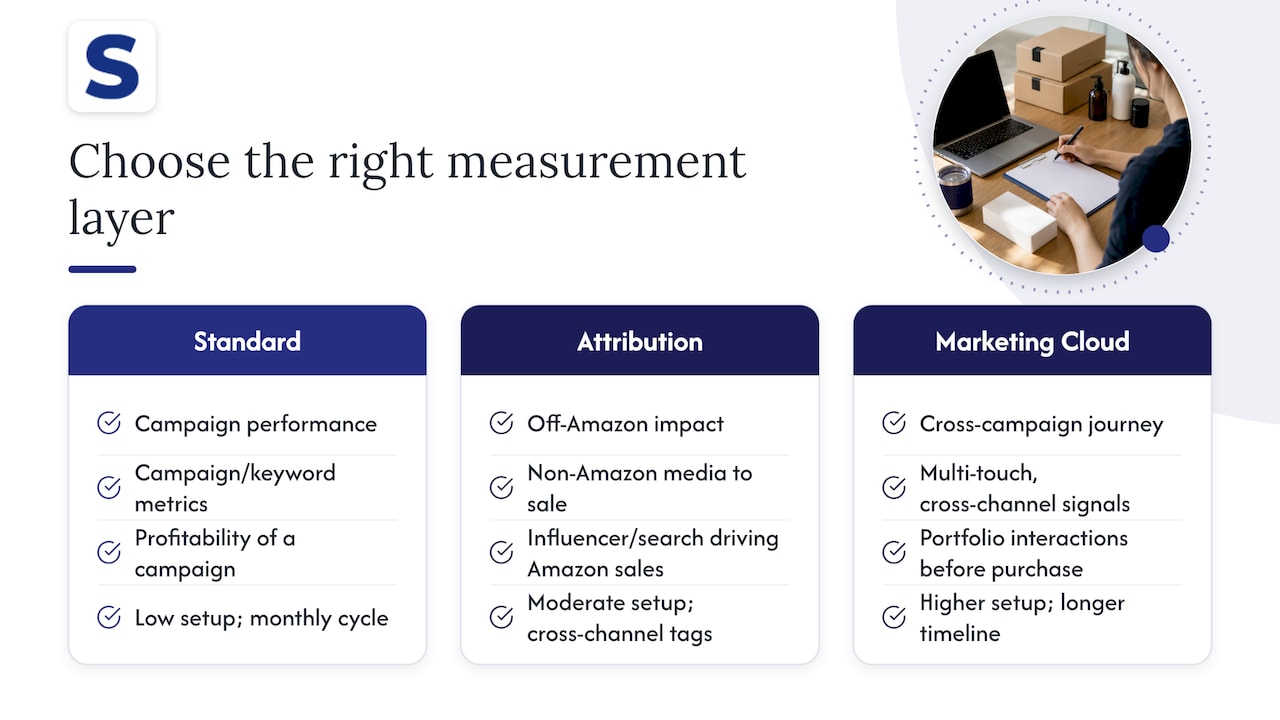
Standard campaign reporting answers “how did this campaign perform.” It covers impressions, clicks, spend, and sales at the campaign or keyword level, and for most clients, most months, that’s the whole conversation.
Amazon Marketing Cloud and Amazon Attribution answer a different question: what happened across a longer or broader customer journey, including touchpoints outside Amazon’s own ad products. Attribution is built for measuring non-Amazon media, like a client’s social or search spend that eventually drives an Amazon purchase. Marketing Cloud is built for privacy-safe custom analysis across signals that standard reports don’t expose, such as overlap between campaign types or multi-touch paths within Amazon’s ecosystem.
The decision rule is simple: pick the least complex measurement layer that answers the actual question a client is asking. If a client wants to know whether their Sponsored Products campaign is profitable, standard campaign reporting answers it directly. If a client wants to know whether their off-Amazon influencer spend is driving Amazon sales, that requires Attribution. If a client wants to understand how their full campaign portfolio interacts before a purchase, that’s a Marketing Cloud question, and it typically requires more setup and a longer timeline than a standard reporting cycle allows.
Reaching for Marketing Cloud or Attribution by default, when a client’s question is really a standard performance question, adds complexity without adding insight.
Security and Privacy When Sharing Amazon Ads Data With Clients
Client reports carry sensitive information: spend levels, margin-adjacent metrics like ACOS, and sometimes catalog-level performance that competitors would want. A few practices keep that data contained to the people who should see it.
Scope access deliberately. A dashboard link should go to named recipients, not a public URL that anyone with the link can open indefinitely. Where your tooling supports expiring links or password protection, use it for anything beyond a static PDF.
Separate credentials from deliverables. API keys, advertiser profile IDs, and connector authorization tokens belong in your internal systems, never pasted into a report or an email thread with a client.
Match retention to need. Archived raw exports used for audit purposes should live in storage with the same access controls as the rest of your client data, not in a shared folder that’s convenient but loosely permissioned.
Be explicit about what a report contains before sending it, especially for agencies managing multiple brands that could be considered competitors. A template built for one client should never accidentally carry another client’s figures in a leftover column or cached chart.
Finally, treat the pre-send human review as a security step as much as a quality step: a second set of eyes catches an accidental cross-account data pull faster than any automated validation does.
Common Challenges in Amazon Ads Client Reporting Workflows
A few problems show up repeatedly across agencies running automated reporting, and most have a straightforward fix.
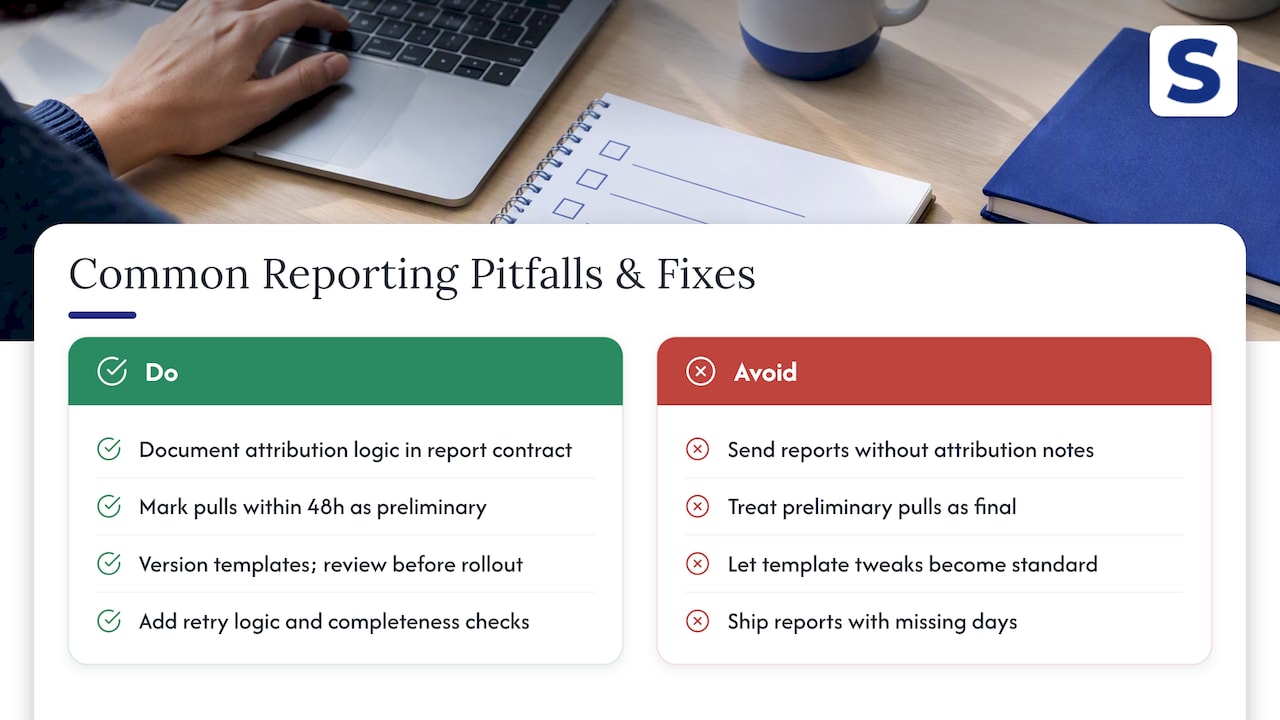
Mismatched numbers between reports are the most common complaint, usually caused by different attribution windows or date boundaries between two pulls. Fixing this means documenting the attribution logic in the report contract itself, not just in an internal wiki no one checks.
Late-arriving conversion data causes a report to look accurate on send day and wrong a week later. Flagging any report pulled shortly after period close as preliminary, and noting that in the client-facing document, heads off the “why did my numbers change” conversation.
Template drift happens when one account manager tweaks a template for a specific client request and that change quietly becomes the new standard. Versioning templates and reviewing changes before they roll out account-wide keeps this contained.
Failed or incomplete API pulls are an infrastructure problem, not a reporting problem, but they surface as a reporting problem when a report goes out with missing days. Retry logic with backoff and a completeness check before rendering catches most of these before a client ever sees them.
Finally, over-automation without review produces reports that are technically accurate and practically useless: a spike with no explanation, a gap with no context. The fix isn’t more automation, it’s a short human pass before anything ships, which is worth revisiting if your own workflow has been running fully hands-off for a while. For deeper detail on the interpretation step specifically, see our guide on Amazon ad tracking.
What Changed When We Automated Our Own Reporting Process
Before automating, a single client review cycle could eat half a day between pulling exports, reformatting them, and writing commentary. Moving to a scheduled pipeline with a standard report contract cut that to a final review pass. Client calls shifted too: instead of walking through raw numbers, we spent that time on the action plan, which is the conversation clients actually wanted.
— Selloop
How Selloop Fits Into Your Reporting Workflow
Once the reporting pipeline is built, the harder problem is knowing what to act on before the next report goes out. We built Selloop to handle that layer: it ingests campaign performance automatically, flags high-spend campaigns underdelivering on return, and backs every recommendation with the exact data behind it rather than a generic suggestion.
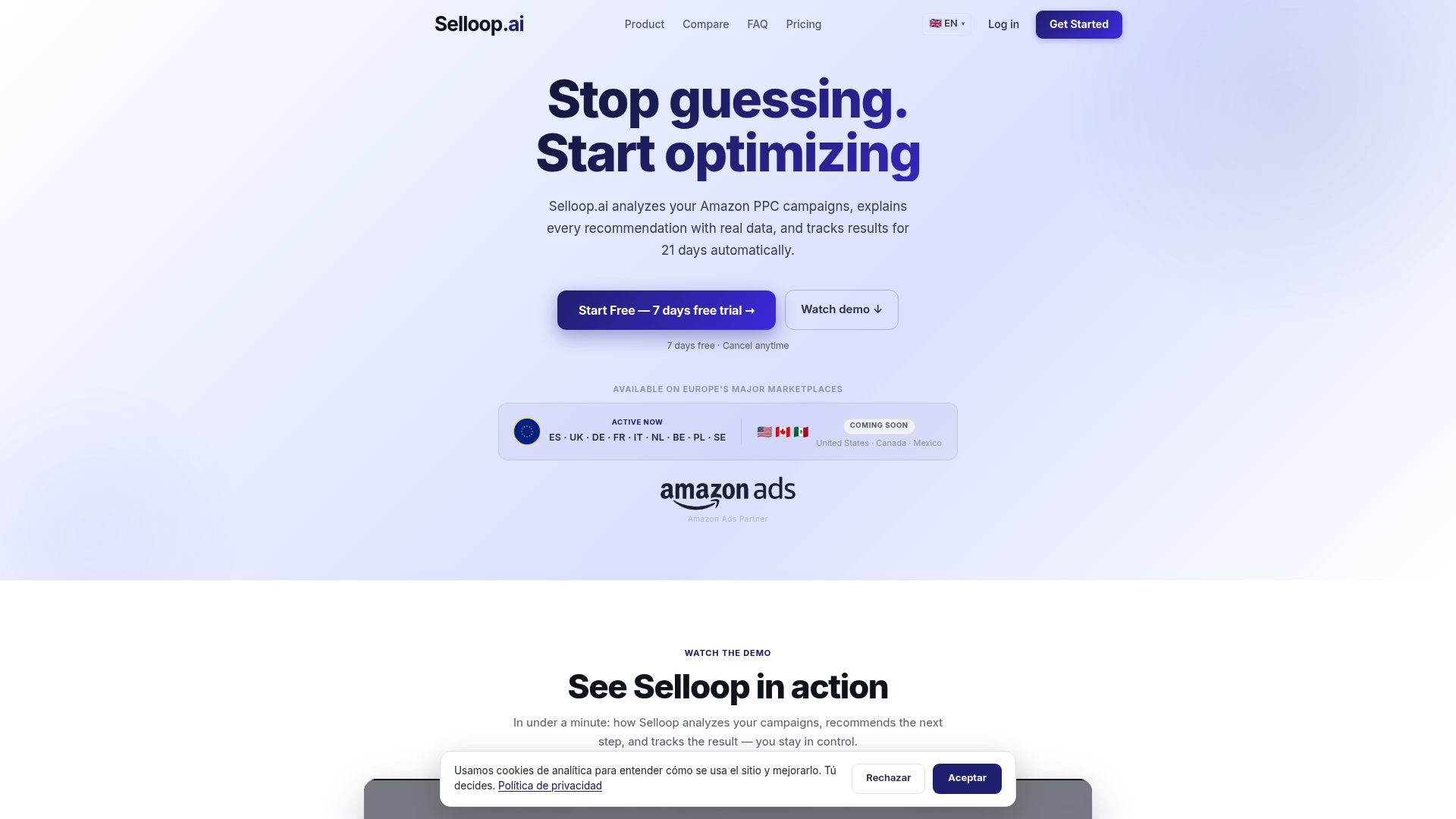
Every change we recommend gets tracked for 21 days so you see a real verdict before reporting it as a win, and you can set the optimization profile to conservative, balanced, or aggressive depending on how much risk a given account can absorb.
- Automated ingestion and campaign health scoring across every connected account.
- Data-justified recommendations with expected monetary impact.
- 21-day tracking on every change, so client reports reflect outcomes, not guesses.
Plans start with STARTER at $29 per month, scaling up through GROWTH and PRO, with a separate tier for agencies and enterprise accounts managing multiple clients.
FAQ
What should an automated Amazon Ads client report include?
A client report should include an executive summary, top-line KPIs like spend and ACOS, a trend comparison to the prior period, and a short prioritized action plan. The campaign reporting documentation also recommends including Amazon-specific metrics like new-to-brand sales where relevant to the client’s goals.
Do I need Amazon Marketing Cloud for client reporting?
No, most client reporting is well served by standard campaign reporting covering impressions, clicks, and sales. Amazon Marketing Cloud is worth adding only when a client needs custom cross-signal analysis that standard reports don’t expose.
What happens to legacy Amazon Ads reports in 2026?
Legacy Sponsored Ads and DSP report types are expected to be phased out as part of the move to unified reporting. Any scheduled report built on the old report types should be recreated in the unified system before that date.
How do I keep client reports accurate before sending them?
Run a pre-send checklist covering data completeness, late-arriving conversion data, and any unexplained spikes or gaps, then add a short written commentary. Automated pulls handle extraction reliably, but a human review step catches context that raw numbers miss.
How does Selloop help with reporting to clients?
Selloop tracks every AI-recommended change for 21 days and shows the measured outcome, which agencies can use as evidence in client reports rather than relying on raw dashboard numbers alone. Pricing starts at $29 per month on the STARTER plan.