Best Amazon Keyword Tools for Sellers in 2026

For most Amazon sellers, Selloop.ai is the strongest pick when keyword research needs to connect directly to PPC performance. It automates keyword harvesting from your ad search terms, suggests negatives to cut waste, and tracks every change over a 21-day window so you can see what actually moved the needle. If you want organic-first research with a full suite, Helium 10 is the go-to. For free or near-free options, Sonar and Amazon’s own autocomplete get you started without spending a dollar.
Here’s the quick shortlist by job-to-be-done:
- PPC-driven sellers and agencies: Selloop.ai — automated harvesting from ad search terms plus 21-day outcome validation
- Organic listing research and full-suite work: Helium 10 — reverse-ASIN, keyword tracking, listing optimization in one place
- Budget or free starting point: Sonar / Amazon autocomplete — zero cost, surprisingly useful for seed terms and long-tail discovery
The signals that shaped this ranking: click-share and ad-search-term data, reverse-ASIN capability, US data freshness, and whether a free trial exists. Amazon Seller University’s three-stage framework — find, incorporate, measure — is the backbone here. Tools that only cover “find” without helping you measure are ranked lower.
Pro Tip: Before you commit to any paid tool, run a 7-day free trial and test one specific task: pull a reverse-ASIN on your top competitor and check whether the keyword list matches what you’re already bidding on. If it surfaces ten terms you’ve never touched, the tool is earning its keep.
Key Takeaways
For PPC-driven sellers, the best Amazon keyword tools are those that connect keyword discovery to ad performance data and track outcomes over time, not just those with the longest keyword lists.
| Point | Details |
|---|---|
| PPC signals beat raw volume | Click-share and ad-search-term data predict conversions better than search volume alone. |
| Free tools cover the basics | Sonar, Keyword Tool Dominator, and Amazon autocomplete build solid seed lists at zero cost. |
| 21-day validation is non-negotiable | Wait 21 days after any listing or bid change before evaluating impact or making further adjustments. |
| Reverse-ASIN is a must-have | Any paid tool without reverse-ASIN lookup leaves a critical competitive research gap. |
| Selloop for PPC-first sellers | Selloop automates keyword harvesting from ad search terms and tracks every change over a 21-day window, starting at €29/month with a 7-day free trial. |
Table of Contents
- Which Amazon keyword tools are worth your money?
- Mini-reviews of every major Amazon keyword research tool
- How to choose the right Amazon keyword tool for your business
- Free and low-cost tools that still move the needle
- How to apply keywords to your listings and measure what works
- How we evaluated these tools and built the shortlist
- Why click-share beats raw volume for conversion-focused sellers
- How I’d pick a tool for three different seller profiles
- Selloop turns your ad data into your keyword strategy
- Useful sources for deeper research
Which Amazon keyword tools are worth your money?
| Tool | Best for | Key keyword features | PPC / ad-data signals | Rank tracking | US data freshness | Pricing / trial |
|---|---|---|---|---|---|---|
| Selloop.ai | PPC-first sellers and agencies | Automated ad-search-term harvesting, negative keyword suggestions | Yes — ad search terms, bid recommendations | 21-day change tracking | Real-time ad data | From €29/mo; 7-day free trial |
| Helium 10 | All-in-one suite users | Reverse-ASIN (Cerebro), keyword harvesting (Magnet), rank tracking | Limited PPC integration | Yes | Frequent updates | Free tier; paid from ~$29/mo |
| Jungle Scout | Product discovery + keyword research | Keyword Scout, search volume estimates | Basic | Yes | Regular | Free trial; paid from €29/mo |
| AMZScout | Budget beginners | Keyword tracker, product research | Minimal | Basic | Moderate | Free trial; lower-cost plans |
| ZonGuru | Listing performance + operations | Keywords on Fire, listing optimizer | Minimal | Yes | Regular | Free trial available |
| DataDive | Category-level analytics | Market trend analysis, keyword clustering | Minimal | Limited | Regular | Paid; check vendor site |
| SmartScout | Competitive ASIN intelligence | ASIN-level keyword and brand analysis | Minimal | Limited | Regular | Paid; check vendor site |
| SellerSprite | Organic listing improvement | Keyword mining, listing analysis | Minimal | Yes | Regular | Paid; check vendor site |
| Sonar | Free autocomplete discovery | Autocomplete-based keyword lists | None | None | Marketplace-based | Free |
| Keyword Tool Dominator | Long-tail autocomplete harvesting | Amazon autocomplete extraction | None | None | Autocomplete-based | Free tier; paid plans available |
| Google Keyword Planner | Cross-channel demand estimates | Web search volume, related terms | Google Ads integration | None | Real-time web data | Free (Google Ads account) |
| Google Trends | Seasonality and trend spotting | Relative interest over time | None | None | Real-time | Free |
| Ahrefs | Clickstream-backed volume metrics | Clicks, CPS, return rate, 170+ countries | None | Limited | Clickstream-updated | Paid; limited free use |
A note on US data freshness: Tools pulling from Amazon’s autocomplete (Sonar, Keyword Tool Dominator) reflect live shopper queries but lack volume estimates. Clickstream-backed tools like Ahrefs provide volume context derived from real browsing behavior. Ad-search-term tools like Selloop pull from your own live campaign data, which is the freshest signal of all.
Sellers who rely on raw search volume alone often chase high-traffic terms that established brands already dominate. Click-share and conversion trends over rolling windows give a far more actionable picture of whether a keyword is actually winnable.
Mini-reviews of every major Amazon keyword research tool
Selloop.ai
Selloop is built around a specific insight: the most valuable keywords for your listings are the ones already converting in your ad campaigns. Instead of starting from a blank seed term, Selloop harvests keywords directly from your Sponsored Products and Sponsored Brands search term reports, flags which ones are worth scaling, and recommends which to negate. Every change you approve gets applied to Amazon automatically, then tracked over a 21-day window to confirm whether it actually improved performance.
That 21-day validation loop is what separates Selloop from most tools on this list. You’re not just discovering keywords; you’re closing the loop between discovery and outcome.
Standout features: Automated ad-search-term harvesting, negative keyword suggestions with data justification, campaign health scoring, customizable AI profiles (conservative, balanced, aggressive), and smart alerts.
Best for: PPC-first sellers, agencies managing multiple accounts, and sellers who want keyword decisions backed by real ad performance data rather than estimated volume.
Pricing: Plans start at €29/month with a 7-day free trial. Tiers scale by managed ad spend and number of accounts.
Jungle Scout
Jungle Scout built its reputation on product research, and its keyword tools reflect that origin. Keyword Scout ties search volume estimates to product opportunity data, so you can evaluate a keyword alongside the competitive landscape for the products ranking on it. Useful for sellers still deciding what to sell, less so for those optimizing an existing catalog.
- Cons: — PPC integration is thin; keyword data is less granular than Helium 10 or Ahrefs
Sonar by Perpetua (Keyword Research by Sonar)
Sonar is free, which is its main selling point. It surfaces Amazon autocomplete suggestions for any seed term and organizes them into a downloadable list. The data comes directly from Amazon’s search bar, so it reflects real shopper queries. Volume estimates are rough, and there’s no reverse-ASIN or PPC integration, but for a seller just starting out, it’s a legitimate first step.
Best for: Free autocomplete-based keyword discovery.
Keyword Tool Dominator (Amazon Keyword Tool)
Keyword Tool Dominator extracts Amazon autocomplete phrases systematically from a seed term, going deeper into long-tail variations than a manual search would. The free tier covers basic extraction; paid plans unlock more depth and export options. It’s a focused tool that does one thing well: harvest long-tail autocomplete phrases at scale.
Best for: Long-tail harvesting and seed-term expansion.
Google Keyword Planner
Google Keyword Planner isn’t an Amazon-specific tool, but it’s useful for one specific job: understanding cross-channel demand and seasonality. If you’re trying to gauge whether a product category has consistent year-round demand or spikes around specific events, Keyword Planner’s web search volume data adds context that Amazon-only tools miss. Free with a Google Ads account.
Best for: Cross-channel demand validation and campaign planning.
Google Trends
Google Trends shows relative search interest over time, not absolute volume. That distinction matters. A keyword trending upward on Google often signals rising Amazon demand before it shows up in Amazon’s own dashboards. Useful for spotting seasonal windows and emerging categories before competitors do.
Best for: Seasonality checks and early trend identification.
Ahrefs (Amazon Keyword Tool / Site Explorer)
Ahrefs applies its clickstream methodology to Amazon keyword research, providing metrics like clicks per search and return rate alongside volume estimates. The result is a richer picture of how searchers actually behave on a keyword, not just how often they type it. Coverage spans over 170 countries, making it particularly useful for sellers operating across multiple marketplaces.
- Cons: — Not Amazon-native; no direct listing or PPC integration
Pro Tip: Pair Ahrefs’ clicks-per-search metric with your Helium 10 reverse-ASIN data. A keyword with high search volume but low clicks per search often means shoppers aren’t finding what they want — which is either a gap to exploit or a sign the intent doesn’t match your product.
How to choose the right Amazon keyword tool for your business
The right tool depends on what you’re trying to accomplish, not on which platform has the most features. Here’s a practical checklist to work through before committing to a paid plan.
Selection criteria:
- US data coverage and freshness. Does the tool pull from live Amazon data, clickstream sources, or autocomplete? Each has different lag times and accuracy profiles. Ad-search-term tools like Selloop reflect real-time campaign data; autocomplete tools reflect live shopper queries; clickstream tools like Ahrefs update on a rolling basis.
- Reverse-ASIN capability. Can you enter a competitor’s ASIN and see which keywords it ranks for? This is non-negotiable for competitive research. Tools without it force you to guess.
- PPC integration and ad-data signals. Does the tool connect keyword discovery to your actual ad performance? Click-share and conversion signals are more actionable than raw volume for sellers running ads.
- Rank and keyword tracking. Can you monitor whether a keyword’s organic position improves after you add it to a listing? Without tracking, you’re optimizing blind.
- Trial availability. Any tool worth paying for should offer a free trial. Use it to test one specific workflow, not just to browse the interface.
- API or browser extension. If you manage a large catalog or work across multiple accounts, API access or a Chrome extension saves significant time.
Questions to ask during a trial:
- Does the reverse-ASIN output match keywords you’re already ranking for? If not, the data may be stale.
- Can you export keyword lists in a format your listing tool or ad platform accepts?
- How does the tool handle keywords with no volume data? Does it hide them or flag them?
Red flags to watch for:
- No US-specific data, only global aggregates
- No free trial or money-back window
- Volume estimates with no methodology explanation
- No reverse-ASIN or competitor click data
- Opaque sampling windows with no update frequency stated
A simple scoring approach: rate each candidate tool 1–3 on each criterion above. Any tool scoring below 12 out of 18 probably has a gap that will cost you time or money within the first month.
Free and low-cost tools that still move the needle
Paid tools earn their keep at scale, but several free options deliver real value, especially when you’re validating a new product or building an initial keyword list.
The free toolkit:
- Amazon Search Auto-Complete: Type a seed term into Amazon’s search bar and note every autocomplete suggestion. These are real queries from real shoppers. Append letters (A through Z) after your seed term to surface hundreds of variations manually.
- Sonar (Keyword Research by Sonar): Paste a seed term and get an organized list of autocomplete-derived suggestions. Faster than manual autocomplete scraping, and free.
- Keyword Tool Dominator: Automates the autocomplete extraction process and goes deeper into long-tail variations. The free tier covers basic use; paid plans add export depth.
- Google Trends: Check whether your target keyword has seasonal spikes. A product that peaks in November needs a different launch timeline than one with flat year-round demand.
- Google Keyword Planner: Useful for cross-channel demand context. Web search volume won’t match Amazon volume exactly, but it confirms whether broad interest exists.
A three-step process for free keyword harvesting:
- Enter your main product term into Amazon’s search bar and collect every autocomplete suggestion. Do the same in Sonar. You’ll have 50–100 raw terms in under 15 minutes.
- Run the list through Google Trends to identify any terms with clear seasonal patterns. Flag those for timing-specific campaigns.
- Take your top 10–15 terms and test them in a low-budget Sponsored Products campaign for 7–10 days. The search term report from that campaign is your first real signal of which terms convert.
When free tools aren’t enough:
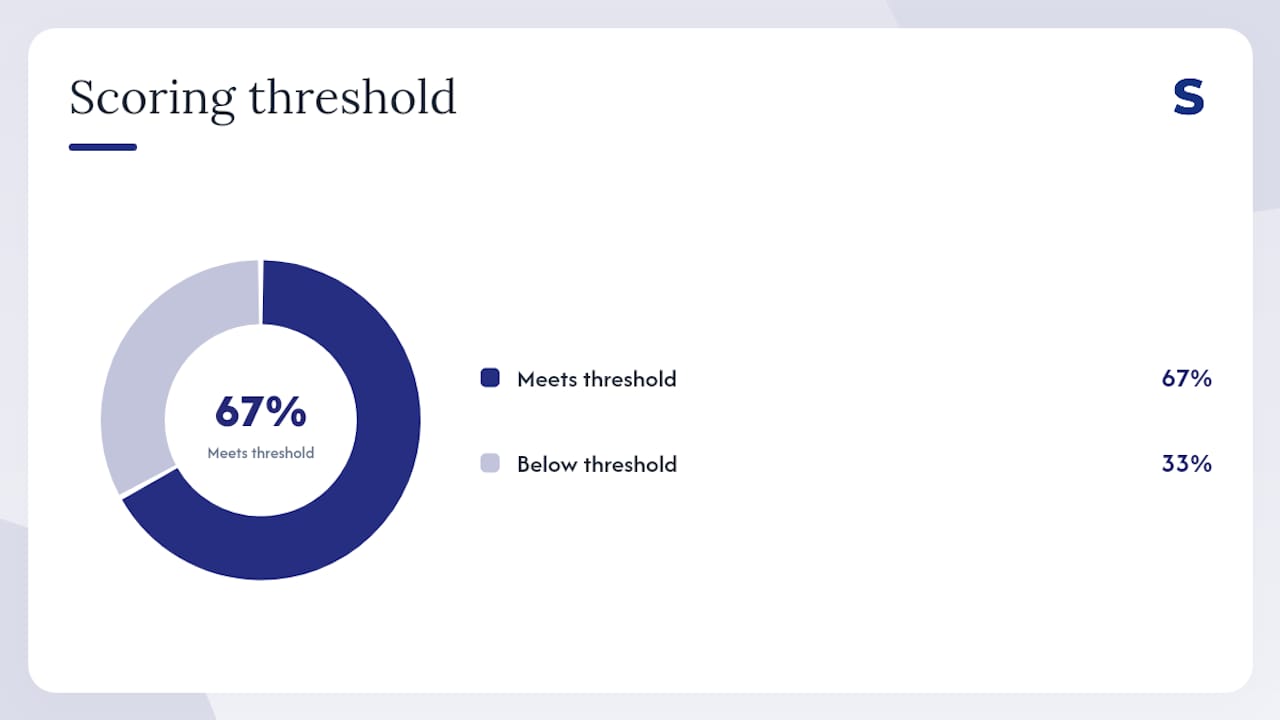
Free tools can’t tell you whether a keyword is dominated by three brands with 80% click-share, or whether a competitor’s ASIN ranks for 400 keywords you’ve never considered. When you need reverse-ASIN data, click-share metrics, or automated harvesting from your own ad reports, a paid tool pays for itself quickly.
Pro Tip: Run a 7-day free trial of a paid tool immediately after building your free keyword list. Use the trial specifically to run reverse-ASIN on your top two competitors. The gap between your current keyword coverage and theirs is your optimization roadmap.
How to apply keywords to your listings and measure what works
Discovering keywords is the easy part. Applying them correctly and knowing whether they worked is where most sellers fall short. Amazon Seller University’s guidance outlines a three-stage process: find high-intent terms, incorporate them into listing elements and backend fields, then measure performance through Amazon’s dashboards.
Step 1: Harvest and prioritize
Pull keywords from your tool of choice and sort by a combination of relevance and conversion signal, not just volume. A keyword with 50,000 monthly searches that three dominant brands own isn’t your opportunity. A keyword with 8,000 searches and fragmented competition often is. Use KwickMetrics’ approach as a model: filter by click potential and competitor dominance, not just Search Frequency Rank.
Step 2: Place keywords where they count
- Title: Your single most important placement. Lead with the highest-priority keyword naturally. Don’t stuff; Amazon’s algorithm reads context.
- Bullet points: Work in secondary keywords while keeping copy readable. Shoppers read bullets; keyword-stuffed bullets hurt conversion.
- Backend search terms: Use this field for synonyms, alternate spellings, and terms that don’t fit naturally in visible copy. No repetition needed; Amazon indexes each term once.
- Product description / A+ content: Lower indexing weight, but still worth including natural keyword variations.
Step 3: Measure over a 21-day window
After any listing change, wait at least 21 days before drawing conclusions. Amazon’s indexing and ranking signals take time to reflect changes, and conversion data needs volume to be statistically meaningful. Track:
- Sessions and unit session percentage (conversion rate proxy in Seller Central)
- BSR movement in your primary category
- Keyword rank for your target terms
- ACOS if you’re running ads on the same keywords
Common mistakes that cost sellers rankings:
- Adding every keyword from a tool without checking relevance to the actual product
- Repeating the same keyword across title, bullets, and backend (Amazon indexes it once; repetition wastes space)
- Changing multiple listing elements simultaneously, making it impossible to know what drove any change
- Ignoring the search term report from PPC campaigns, which is the most direct signal of what shoppers actually typed before buying
How we evaluated these tools and built the shortlist
Transparency matters when a publisher is also one of the products being reviewed. Here’s exactly how this list was built.
Selection criteria:
- US data coverage and update frequency
- Availability of reverse-ASIN lookup
- Metrics beyond raw volume: click-share, ad-search-term data, conversion signals
- UI accessibility for sellers without a data background
- Free trial availability
- API or browser extension support for workflow integration
Data sources used:
- Clickstream datasets (Ahrefs’ documented methodology)
- Amazon Brand Analytics data where available to brand-registered sellers
- Vendor-documented metrics and feature pages
- Amazon’s own Search Query Performance and Top Search Terms dashboards as baseline references
Testing approach:
Reverse-ASIN checks were run on representative ASINs across categories. Ad-search-term harvesting was evaluated through Selloop’s 21-day tracking framework. Free tools were tested against manual Amazon autocomplete to verify output quality.
Disclosure: This article is published by Selloop, an AI-driven Amazon PPC optimization tool included in the comparison above. Selloop is listed first in the table by editorial convention for the publisher, and its case is made on documented features. Every other tool is evaluated on its own merits. Where a competitor leads on a specific dimension — Helium 10’s reverse-ASIN depth, Ahrefs’ clickstream methodology — that is stated plainly.
Why click-share beats raw volume for conversion-focused sellers
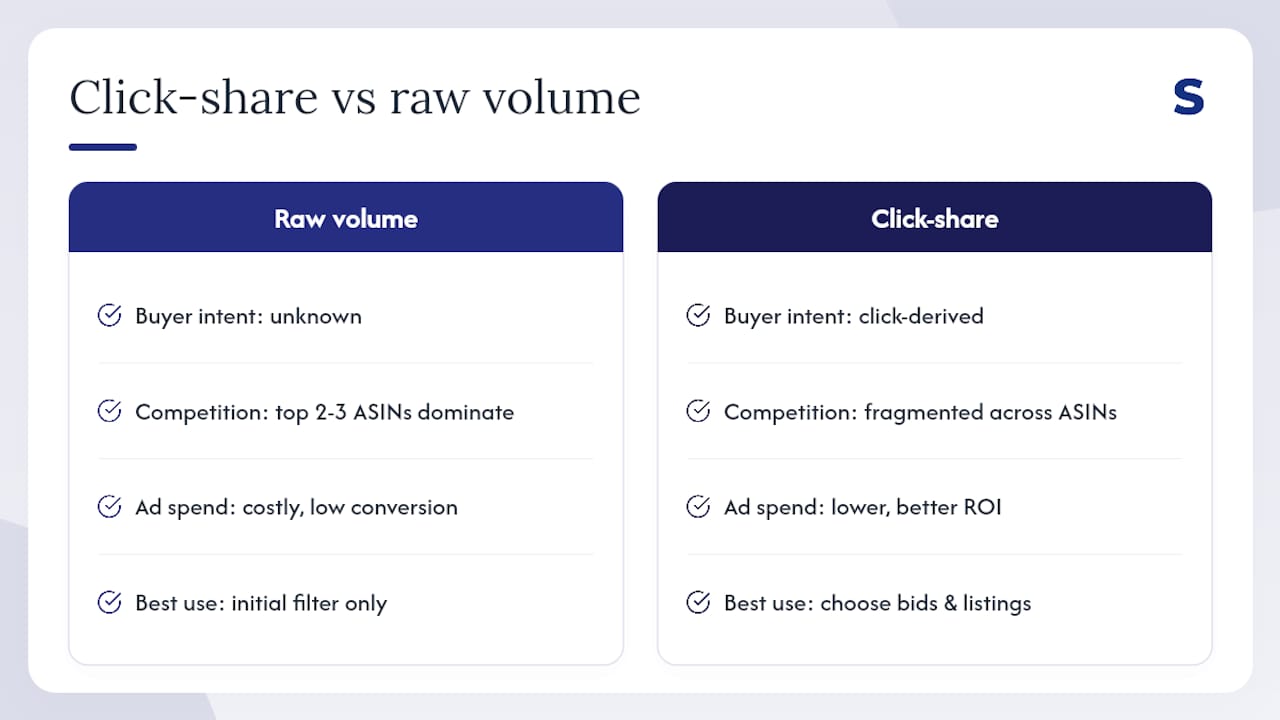
Raw search volume tells you how many people typed a query. It doesn’t tell you whether any of them bought something, or whether three brands already own the page. That gap is where most keyword strategies break down.
Consider a practical illustration. A keyword like “stainless steel water bottle” might show 200,000 monthly searches. But if the top three ASINs capture the majority of clicks and those brands have thousands of reviews, a new seller bidding on that term is paying for impressions that rarely convert. A narrower term like “insulated water bottle for hiking 32oz” might show a fraction of that volume, but with fragmented competition and a buyer who knows exactly what they want.
Platforms that connect keywords to click-share and conversion trends over rolling windows give sellers a far more actionable picture of whether a keyword is winnable. Volume is a starting filter, not a decision.
The 21-day tracking window matters for the same reason. When you add a keyword to a listing or launch a bid on a new search term, the first few days of data are noisy. Indexing takes time. Conversion signals need volume. Observing performance over 21 days before making another change lets you isolate cause and effect. Selloop’s tracking framework is built around this principle: every approved change is logged, and the outcome is measured against the pre-change baseline over that window.
For tool selection, this means prioritizing platforms that expose ad-search-term data and click-derived metrics over those that only surface volume estimates. Ahrefs’ clickstream methodology provides clicks per search and return rate, which are meaningful proxies for intent quality. Tools that combine Brand Analytics, Search Query Performance, and autocomplete data, as KwickMetrics documents, reduce blind spots that volume-only tools leave open.
Pro Tip: When evaluating a keyword’s true opportunity, check click-share distribution before bidding. If two or three ASINs dominate clicks on a high-volume term, your ad spend will be expensive and your organic ranking climb will be slow. Shift budget to terms where click-share is fragmented across five or more ASINs.
How I’d pick a tool for three different seller profiles
The conventional wisdom in most Amazon tool roundups is to recommend the platform with the most features. That’s usually the wrong frame. More features mean more time learning and more monthly spend, neither of which helps a seller who needs results in the next 30 days.
For a seller just starting out, the right move is free tools first. Use Amazon autocomplete and Sonar to build an initial keyword list, run a small Sponsored Products campaign, and let the search term report tell you what’s actually converting. That report is your first real keyword dataset, and it costs nothing beyond your ad spend. Only after you have 30–60 days of campaign data does a paid tool start paying for itself.
For a scaling seller with an established catalog and active PPC campaigns, the calculus flips. At that point, the bottleneck isn’t finding keywords; it’s knowing which ones to act on and whether the actions you took last month actually worked. That’s where a PPC-focused tool with automated harvesting and outcome tracking earns its keep. The time saved on manual search term analysis alone typically covers the subscription cost within the first month. Whether Amazon PPC is worth the investment at your current scale is worth checking before committing to a full-featured platform.
For an agency managing multiple seller accounts, the priorities shift again: multi-account support, automated recommendations, and clear reporting for clients. Selloop’s tiered pricing by managed ad spend and account count is built for exactly this profile. The 21-day tracking window also gives agencies something concrete to show clients: here’s what we changed, here’s what happened.
One honest note on time-to-value: no keyword tool delivers results in a week. The 21-day window exists because Amazon’s algorithm needs time to respond to changes. Sellers who switch tools every month because they “aren’t seeing results” are usually measuring too early, not using the wrong tool.
Selloop turns your ad data into your keyword strategy
Most keyword tools give you a list and leave you to figure out what to do with it. Selloop starts from the other end: it reads your live Sponsored Products and Sponsored Brands campaigns, identifies which search terms are already converting and which are draining budget, and tells you exactly what to change.
The automated keyword harvesting pulls directly from your ad search term reports. Negative keyword suggestions come with data justification, not guesswork. Every approved change is applied to Amazon automatically and tracked over a 21-day window, so you can see whether the optimization actually worked. Campaign health scoring and smart alerts mean you’re not checking dashboards manually every day.
Plans start at €29/month. A 7-day free trial gives you enough time to run a full harvest cycle on your existing campaigns and see what Selloop surfaces. For sellers who want to connect keyword research directly to PPC outcomes, that trial is the fastest way to find out whether the gap between your current keyword coverage and your competitors’ is as large as it probably is.
Start your free trial at Selloop.ai and run your first keyword harvest in under 10 minutes.
Useful sources for deeper research
The sources below back specific claims in this article and are worth bookmarking for ongoing reference.
| Source | What it supports |
|---|---|
| Amazon Seller University — Keyword Research | Three-stage find/incorporate/measure framework; Search Query Performance and Top Search Terms dashboards |
| Ahrefs Amazon Keyword Tool | Clickstream-backed volume, clicks per search, return rate, 170+ country coverage |
| Keyword Tool Dominator | Amazon autocomplete extraction; long-tail harvesting methodology |
| Google Trends | Seasonality signals and cross-channel demand context |
A note on vendor claims: pricing, trial lengths, and feature availability change frequently. Verify current details directly on each vendor’s site before purchasing. Independent testing, where available, is a stronger signal than marketing copy.